Disclosure: Smart Gear Picks earns a commission from qualifying Amazon purchases made through links on this page, at no extra cost to you. Prices are approximate, based on manufacturer, review-site and price-tracker sources, and they change often. Check the current price on Amazon before buying.
Prices checked on November 27, 2026 (approximate; prices change)
I spent a whole year of video calls and late-night YouTube listening to my monitor’s built-in speakers. Voices sounded like they were coming through a paper cup, and music had no body at all. Then I put a $20 pair of desk speakers next to the screen, and the difference was so obvious I felt a little silly for waiting.
You do not need studio monitors to fix tinny laptop or monitor sound. Below are five real PC speakers sold on Amazon US for roughly $16–$43. One has Bluetooth and a single USB-C cable, two are tiny stereo pairs that run on USB power, one is a slim RGB soundbar that fits under a monitor, and one adds a small subwoofer for actual bass. We compared watts, connections, size, warranty and common owner complaints.
Quick picks
- Best Overall: Creative Pebble V3 (~$38–$43)
- Best Budget Pair: Creative Pebble (~$18–$25)
- Best One-Cable USB Fix: Logitech S150 (~$16–$20)
- Best Under-Monitor Soundbar: Redragon GS560 Adiemus (~$24–$35)
- Best Bass (2.1 with Subwoofer): Cyber Acoustics CA-3090 (~$38–$40)
Comparison table
| PC speaker | Price | Type | Power (RMS) | Connection | Power source | Size (each unit) | Warranty | Best for |
|---|---|---|---|---|---|---|---|---|
| Creative Pebble V3 | ~$38–$43 | 2.0 stereo pair | 8W (16W peak) in high-gain mode | USB-C audio, Bluetooth 5.0, 3.5mm aux | USB-C (USB-A adapter included) | 4.8 × 4.7 × 4.6 in | 1 year | One cable to the PC plus phone streaming |
| Creative Pebble | ~$18–$25 | 2.0 stereo pair | 4.4W | 3.5mm audio | USB-A power | 4.8 × 4.5 × 4.5 in | 1 year | Tight budgets and small desks |
| Logitech S150 | ~$16–$20 | 2.0 stereo pair | 1.2W | USB-A audio (digital) | USB-A | 6.2 × 2.7 × 2.5 in | 3 years | PCs with a dead or noisy headphone jack |
| Redragon GS560 Adiemus | ~$24–$35 | 2.0 soundbar | 4W × 2 rated (no RMS figure published in the US) | 3.5mm audio | USB-A power | 15.8 × 2.7 × 2.8 in | 1 year (see listing) | Under a monitor, RGB setups |
| Cyber Acoustics CA-3090 | ~$38–$40 | 2.1 with subwoofer | 9W (18W peak) | 3.5mm audio; aux input on control pod | Wall adapter | Satellites 7 × 3 × 3 in; sub 8 × 6 × 7 in | 1 year | Bass for music, movies and games |
Specs are from manufacturer pages (Creative, Logitech, Redragon, Cyber Acoustics), Amazon US listing summaries and retailer spec sheets as of November 27, 2026. “See listing” means we could not confirm that spec for the Amazon US version. Prices are approximate, based on camelcamelcamel price history, manufacturer prices and recent listing prices, and they change often.
1. Creative Pebble V3: Best Overall
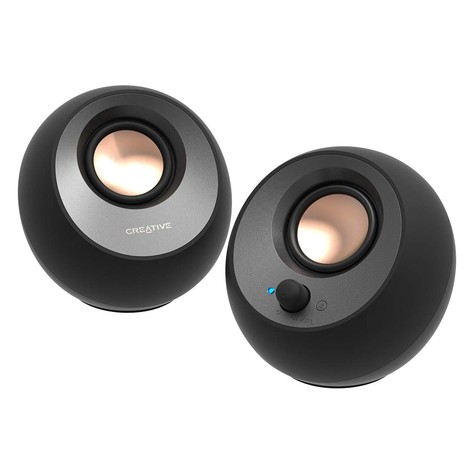
Key specs: 2.0 stereo pair · 2.25 in full-range drivers with rear passive radiators, angled up 45° · 8W RMS / 16W peak in high-gain mode (needs a 10W USB-C port or a 5V/2A USB adapter) · USB-C audio and power over one cable, Bluetooth 5.0 and a 3.5mm aux input · Clear Dialog processing · 100 Hz–17 kHz · 1.35 m cable between speakers · USB-C to USB-A converter included · 1-year warranty · model MF1700
Price: ~$38–$43 (approx. as of Nov 27, 2026; camelcamelcamel shows $37.99 on Nov 19, Creative’s own store has a $37.99 promo, and the list price is $44.99, so it can drift just over $40; prices change)
Who it’s for: Anyone who wants one clean cable from the computer to the speakers, plus the option to play music from a phone over Bluetooth.
Why we picked it
- It is the only pick here with three inputs: digital USB-C audio, Bluetooth 5.0 and a 3.5mm jack, so it works with a laptop, a desktop and a phone.
- The drivers tilt up toward your ears, and Creative says the V3 is about 50% louder than the original Pebble when it gets enough USB power.
- It has about 6,000 ratings at roughly 4.4 stars on Amazon, and PCGamesN called it “brilliant budget Bluetooth computer speakers” in its review.
Watch-outs: Full volume needs a strong port. On an older USB-A port it runs in its quieter mode, and Creative suggests a 5V/2A wall adapter (not included) if it sounds weak or crackles. The 100 Hz floor means punchy but not deep bass. It must stay plugged into USB power even when you use Bluetooth, and the aux cable is not in the box. Amazon’s review summary mentions some Bluetooth dropouts.
2. Creative Pebble: Best Budget Pair
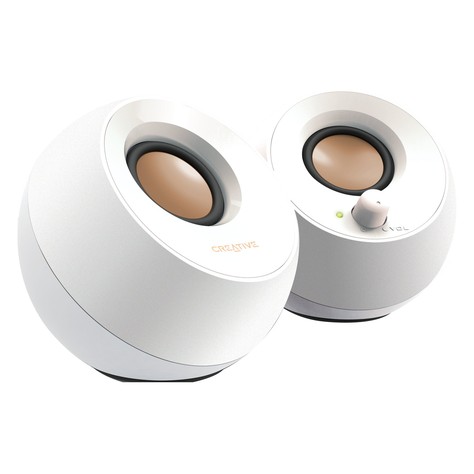
Key specs: 2.0 stereo pair · 2 in full-range drivers with rear passive radiators, angled up 45° · 4.4W RMS total · 3.5mm audio plug plus a USB-A plug for power (5V/1A) · front volume knob · 100 Hz–17 kHz · 1.2 m cables · black or white · 1-year warranty · model MF1680
Price: ~$18–$25 (approx. as of Nov 27, 2026; camelcamelcamel shows $19.99 on Nov 19 for both colors, B&H lists $19.99 and Creative’s store $24.99; prices change)
Who it’s for: Students, home offices and second desks that just need clear sound for calls, YouTube and background music for about $20.
Why we picked it
- It is one of the most-reviewed computer speakers on Amazon, with roughly 68,000 ratings at about 4.6 stars.
- Each orb is only about 4.4 in wide, so a pair fits beside even a small monitor without eating desk space.
- Like the V3, the drivers point up at 45°, so the sound is aimed at your head instead of your chest.
Watch-outs: There is no Bluetooth and no gain boost, and 4.4W is for a desk, not a living room. Sound comes through the analog 3.5mm plug while power comes from USB, so some owners hear a faint hiss or whine from PC electrical noise. Powering it from a phone charger usually fixes that. The cables are attached, so a damaged cord means replacing the set.
3. Logitech S150: Best One-Cable USB Fix
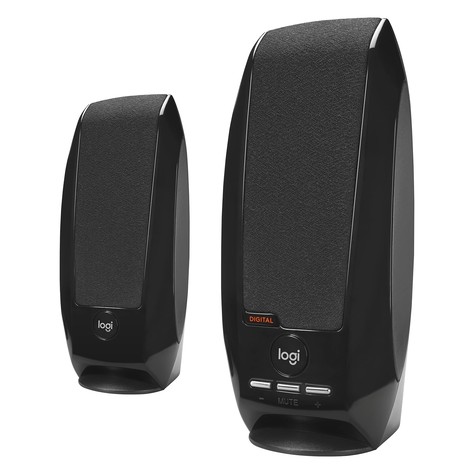
Key specs: 2.0 stereo pair · 2 in drivers · 1.2W RMS (0.6W + 0.6W) · one USB-A cable carries digital audio and power (USB 2.0) · volume and mute buttons on the right speaker · amber power LED · 90 Hz–20 kHz · 6.22 × 2.68 × 2.52 in each · 1.2 m USB cable, 80 cm between speakers · 3-year limited hardware warranty
Price: ~$16–$20 (approx. as of Nov 27, 2026; camelcamelcamel shows Amazon selling it at $15.99 in November, and Logitech’s store lists $19.99; prices change)
Who it’s for: Office PCs, laptops and older desktops with a crackly, worn-out or missing headphone jack, and anyone who wants one plug and zero setup.
Why we picked it
- It is a true USB sound device, so it skips the computer’s analog audio output, along with the hiss and crackle that can come with it.
- The slim upright speakers take up less desk space than anything else here, about 2.7 in wide each.
- Logitech lists a 3-year limited hardware warranty, the longest of our five picks.
Watch-outs: At 1.2W it is the quietest pick by far. It is fine at arm’s length for calls and videos, but music sounds thin. USB-A is the only input, so it will not plug into a phone, a console controller or a monitor’s headphone jack, and USB-C laptops need an adapter. Some owners report flaky volume buttons.
4. Redragon GS560 Adiemus: Best Under-Monitor Soundbar
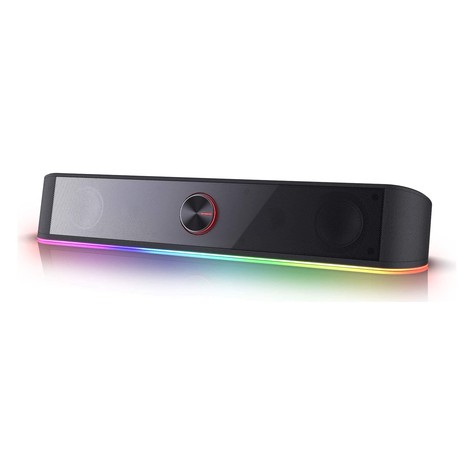
Key specs: 2.0 desktop soundbar · two full-range drivers, rated 4W × 2 by Redragon US (other regional pages list 3W × 2 RMS) · 3.5mm audio plus USB-A power · volume knob with built-in power switch · 4 RGB lighting modes, including music sync, switched by touching the logo · 15.8 × 2.7 × 2.8 in · 1-year warranty (see listing)
Price: ~$24–$35 (approx. as of Nov 27, 2026; camelcamelcamel shows the black version at $23.99 on Nov 19 with a ~$32 average, and Redragon’s store lists $39.99; prices change)
Who it’s for: Gaming desks and narrow setups where two separate speakers will not fit, and anyone who wants lighting that matches an RGB keyboard and mouse.
Why we picked it
- At about 16 inches wide and under 3 inches tall, it slides under most monitors and leaves the sides of the desk free.
- The light strip can pulse to music, which is the feature owners mention most, and you can turn it off.
- A real volume knob on the front beats hunting for volume buttons or a keyboard shortcut.
Watch-outs: Bass and maximum volume are limited, and stereo separation is narrow because both drivers sit in one small box. Owner reviews mention weak bass, some rattle at high volume and finicky touch controls. There is no Bluetooth and no headphone jack. Amazon also lists a pink version under a different ASIN, so make sure you pick the color you want.
5. Cyber Acoustics CA-3090: Best Bass (2.1 with Subwoofer)
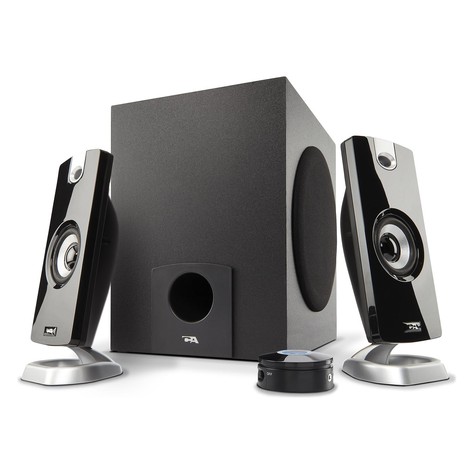
Key specs: 2.1 system · two satellites with 2 in drivers plus a ported, side-firing 4 in subwoofer · 9W RMS / 18W peak · 3.5mm audio input · wired desktop control pod with power, master volume, LED and an aux input · bass knob on the subwoofer · satellites 7 × 3 × 3 in, subwoofer 8 × 6 × 7 in · 110V AC adapter · 1-year warranty
Price: ~$38–$40 (approx. as of Nov 27, 2026; camelcamelcamel shows $37.99 from third-party sellers on Oct 30 with Amazon itself out of stock, B&H lists $38.76, and the list price is $39.99; prices change)
Who it’s for: Gamers and music listeners who care more about bass and fullness than a minimalist desk, and who have a wall outlet and a spot on the floor for the sub.
Why we picked it
- It is the only pick with a dedicated subwoofer, so explosions, kick drums and movie scores get weight that tiny 2.0 speakers cannot produce.
- It runs from a wall adapter, so it is not limited by how much power a USB port can deliver.
- The control pod puts volume and power at your fingertips, and the separate bass knob lets you turn the low end down at night.
Watch-outs: A 4-inch sub adds warmth and thump, not room-shaking rumble. It has the most cables of any pick and needs an outlet. Its rating is the lowest here, about 3.9 stars from roughly 5,200 reviews, with complaints about one channel failing after months of use. Cyber Acoustics’ spec page lists no headphone output, so do not count on one. Amazon itself was out of stock when we checked, so check who the seller is.
How to choose PC speakers under $40
1. Pick the connection first
There are three ways budget PC speakers get sound. USB audio (Pebble V3, Logitech S150) uses one cable for sound and power and skips your computer’s headphone jack, which avoids hiss. 3.5mm analog (Pebble, GS560, CA-3090) works with almost anything that has a headphone jack, including monitors and TVs. Bluetooth lets a phone or tablet play through the speakers, but it adds a little delay, so use a wired input for games.
2. Read RMS watts, not peak
RMS is what a speaker can play continuously; peak is a marketing number. Watch the power source too: a standard USB 2.0 port supplies about 2.5W and a USB 3.x port about 4.5W, so USB-powered speakers can only get as loud as the port allows. That is why the Pebble V3 needs a 10W USB-C port or a 5V/2A adapter for full volume, and why the wall-powered CA-3090 plays louder for its size.
3. Measure your desk
Two small orbs like the Pebbles need about 5 inches on each side of the monitor. A soundbar like the GS560 needs about 16 inches of width in front of or under the monitor. A 2.1 system needs floor space for the subwoofer and an outlet nearby.
4. Decide if you need bass
Every 2.0 pick here rolls off below about 90–150 Hz, which is fine for voices, podcasts and YouTube. For music, movies and games, a 2.1 system with a subwoofer, like the CA-3090, fills in the low end. If you only listen at night or in a shared room, skip the sub.
5. Think about your microphone
If you take calls on speakers, your mic will hear them. Keep the speakers in front of or beside you, and pair them with a directional (cardioid) mic that rejects sound from behind. Our best USB microphones under $50 guide lists cardioid picks that work well next to desk speakers.
FAQ
Are cheap PC speakers better than monitor speakers?
Almost always. Built-in monitor speakers are usually tiny drivers that fire backward or downward with no real enclosure. Even the $20 Creative Pebble has dedicated 2-inch drivers, passive radiators and drivers aimed at your ears, so voices sound fuller and clearer.
Do USB-powered speakers sound worse?
Not necessarily, but they are limited by the port’s power. A USB-powered pair is great for close listening at a desk. If you want more volume, plug the speakers into a 5V/2A wall charger or choose a wall-powered system like the CA-3090.
Why do my computer speakers buzz or hiss?
Usually it is electrical noise from the PC traveling through the analog audio path or the USB power line. Try a different USB port, power the speakers from a wall USB charger, or switch to speakers that take digital USB audio, like the Pebble V3 or Logitech S150, which bypass the headphone jack.
Can I use PC speakers with a laptop, TV or console?
Yes, if the device has a matching output. Speakers with a 3.5mm plug work with a laptop, a TV or a monitor’s headphone jack, but USB-powered ones still need a USB port or charger for power. The Pebble V3 adds Bluetooth for phones and tablets. The Logitech S150 needs a USB-A port on a computer.
Quick takeaway
For most desks, buy the Creative Pebble V3: one USB-C cable, Bluetooth and the best sound here for about $38–$43. Get the Creative Pebble for the best $20 upgrade, the Logitech S150 if your headphone jack is dead or noisy, the Redragon GS560 for a slim RGB soundbar under the monitor, and the Cyber Acoustics CA-3090 if you want real bass from a subwoofer.
Next reads: Small Apartment Desk Setup Under $150 (2026) to build the rest of a compact workstation around your new speakers, and Best Bluetooth Speakers Under $40 (2026) if you also want a portable speaker you can take off the desk.


Leave a Reply