Disclosure: This post contains affiliate links. If you buy through a link, Smart Gear Picks may earn a commission at no extra cost to you.
Prices checked on October 23, 2026. Amazon prices change often, so check the current price before you buy.
Picture a studio apartment where the “office” is a 40-inch desk between the couch and the window. The laptop sits flat, so you spend the day looking down at it. The charger cord runs across the floor to the only outlet, the lamp from your last place takes up a quarter of the desk, and at 7 p.m. it all gets pushed aside so the desk can be a dinner table. Most desk setup guides assume a spare room and a $400 budget. This one doesn’t.
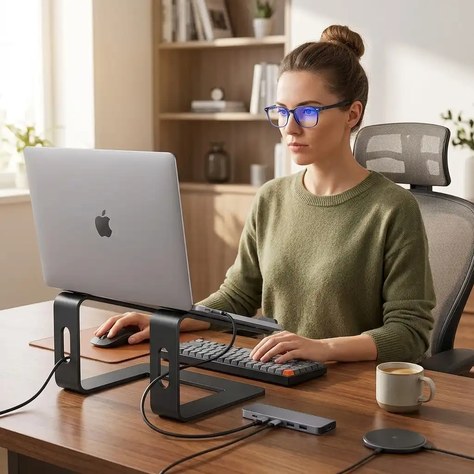
This is a complete five-piece kit for a small desk, and the whole thing comes to about $135.74 at today’s prices. Every piece was picked for one job in a tight space: get the screen up, keep the desktop clear, add light without adding clutter, and get the cords off the floor. The picks are research-based, not hands-on tested: we compared specs, prices, warranties and owner reviews, and four of the five come from our category roundups.
Renter-friendly: nothing in this kit needs screws or drilling.
The complete kit at a glance
| Kit piece | Pick | Best for | Price range | Key specs | Warranty |
|---|---|---|---|---|---|
| Laptop stand | SOUNDANCE LS1 Aluminum Laptop Stand | Raising the screen; storing the keyboard underneath | $18–$25 (black now $19.99) | 6 in lift, 10–15.6 in laptops, 8.8 lb max, 3-piece | 1 year |
| Keyboard + mouse | Logitech Pebble 2 Combo (Pebble Keys 2 K380s + Pebble Mouse 2 M350s) | Saving width; switching between devices | $50–$60 (black now $59.99) | 11 in wide keyboard, 3-device Bluetooth + Logi Bolt, AAA/AA | 1 year limited |
| Lighting | Lepro Clamp Gooseneck LED Desk Lamp (USB) | Zero-footprint task light | $17–$19 | 5W, ~450 lm, 3 tones x 10 levels, clamp to 1.97 in, USB | At least 1 year (Lepro: 1–5 yrs by product) |
| Desk mat | Aothia PU Leather Desk Pad (31.5 x 15.7 in) | Defining a work zone; protecting a rented desk | $12–$17 | 31.5 x 15.7 in, PU leather, 0.08 in, wipe-clean | Lifetime (register on aothia.com) |
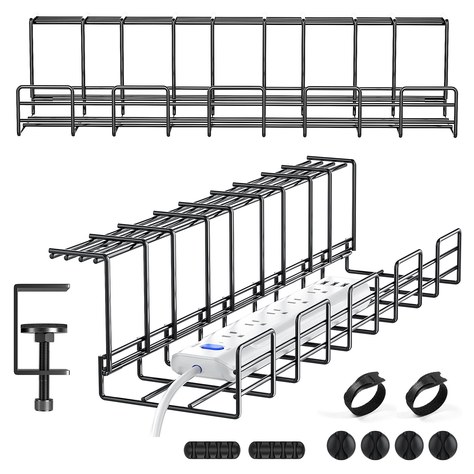
| Cable management | Yecaye No-Drill Under Desk Cable Management Tray (2-Pack, 15.7 in) | Getting the power strip off the floor without drilling | $22–$28 | 2 x 15.7 in trays, desks 0.4–2.3 in, 10 lb, no drill | 30-day returns (no stated warranty) |
| Kit total | All five pieces | A full small-apartment desk | $135.74 at today’s prices (about $125.74 if the Pebble combo is on sale at $50) | No drilling; the lamp runs off one USB port | — |
Budget swaps: Use the keyboard-only Pebble Keys 2 K380s with a mouse you already own to save about $25. Desk thicker than 2 inches? Swap the clamp lamp for a slim-base lamp from our LED desk lamps guide.
1. SOUNDANCE LS1 Aluminum Laptop Stand — Best Laptop Stand for a Small Desk
Price: $19.99 on Amazon right now (black; the silver version is $17.99 and our laptop stands guide links the gray one)
Key specs: Raises the laptop 6 inches; fits 10–15.6-inch laptops; 5 mm aluminum; holds up to 8.8 lb; open front and sides for airflow; detaches into three flat pieces with no tools; non-slip pads; model LS1; 1-year manufacturer warranty.
Who it’s for: Anyone working off a laptop at a 40-inch desk, a kitchen counter or a console table who keeps hunching down toward the screen.
Why it made the kit: This is the piece that makes a small desk feel bigger. The LS1 lifts the screen 6 inches, and the open space under it becomes a parking spot: slide the keyboard underneath when you need the desk for dinner. It has about 51,000 ratings at 4.8 stars and was in our Best Laptop Stands Under $50 roundup. It also comes apart into three flat pieces that fit in a drawer.
Watch-outs: The height is fixed, with no tilt or height settings, so if 6 inches is wrong for your chair, look at an adjustable stand. Typing on the raised laptop is awkward, so you need the keyboard below. Some owners say the pads can slip with heavy 15-inch laptops.
2. Logitech Pebble 2 Combo (Pebble Keys 2 K380s + Pebble Mouse 2 M350s) — Best Compact Keyboard and Mouse
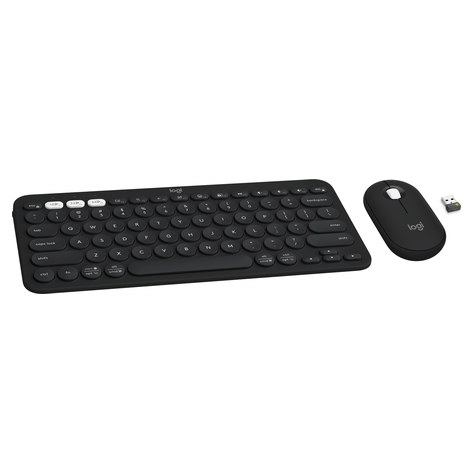
Price: $59.99 on Amazon right now in black (Logitech lists $59.99; some colors sell for about $50, and it dropped to $50 during an August deal)
Key specs: Keyboard 11.0 x 4.9 x 0.6 in (279 x 124 x 16 mm), 415 g; mouse 4.2 x 2.3 x 1.0 in, 76 g; Bluetooth with Easy-Switch for 3 devices, plus a Logi Bolt USB receiver in the box; quiet typing and SilentTouch mouse clicks; 2 AAA (keyboard, up to 36 months) and 1 AA (mouse, up to 24 months), included; Windows, macOS, iPadOS, ChromeOS and Android; 1-year limited hardware warranty.
Who it’s for: Small-desk workers who want a full-feel keyboard and mouse that fit in the space a laptop normally takes, and that work with both a work laptop and a tablet.
Why it made the kit: Without a number pad, the keyboard is just 11 inches wide, so keyboard plus mouse fits inside a 31.5-inch desk mat with room to spare. Easy-Switch moves between a work laptop, a personal laptop and an iPad with one key, and both pieces are quiet enough for late nights in a shared apartment.
Watch-outs: At $59.99 it is the biggest line in the kit; Rose and White often sell for $50–$56. There is no number pad and no backlight, and the round keys take a day or two to get used to. On a tighter budget, the keyboard-only K380s or the Logitech MK270 in our wireless keyboards guide save $25–$35.
3. Lepro Clamp Gooseneck LED Desk Lamp (USB) — Best Space-Saving Desk Light
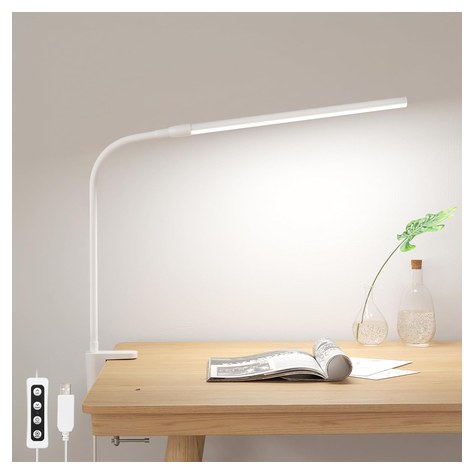
Price: $18.99 (Lepro US and Amazon list price; it often sells for about $17.54)
Key specs: 5W, 430–460 lumens from 54 LEDs; 3 color temperatures (warm, neutral and cool, roughly 3000K/4200K/6500K) x 10 brightness levels; aluminum gooseneck; clamp opens to 1.97 in; USB-A powered with a 4.9 ft cord and inline controls; model PR310005-DWW (white); no wall adapter included; Lepro lists 1–5 years of warranty depending on product.
Who it’s for: Desks with no room for a lamp base, and anyone who works at night in a room where the only light is a ceiling fixture behind them.
Why it made the kit: A clamp lamp uses zero desk space. It grips the back or side edge, and the gooseneck puts light on the keyboard and your face without throwing a reflection on the laptop screen. Because it runs on USB, it doesn’t take an outlet. It has more than 10,000 Amazon ratings at 4.6 stars and was the clamp pick in our Best LED Desk Lamps Under $40.
Watch-outs: There is no wall adapter in the box; use a 5V/2A USB charger, because weaker ports can cause flicker. The clamp only fits desks up to 1.97 inches thick and needs a clean edge with no lip. At about 450 lumens it is a task light, not a room light.
4. Aothia PU Leather Desk Pad (31.5 x 15.7 in) — Best Desk Mat for a Small Desk
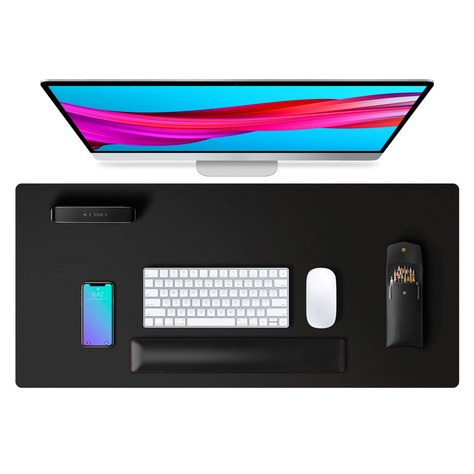
Price: $12.59–$13.99 on Amazon recently (black, 31.5 x 15.7 in; list $16.99)
Key specs: 31.5 x 15.7 in (also 23.6 x 13.7 up to 47.2 x 23.6 in); PU leather top that wipes clean and resists water; cork-suede non-slip backing; about 0.08 in thick; many colors; Aothia offers a lifetime warranty you activate on its site.
Who it’s for: Renters who want to protect a borrowed, glass or worn desk, and anyone who wants a small desk to look like one finished surface instead of a jumble of objects.
Why it made the kit: A mat covers a worn or rented desk and marks out the work zone. The 31.5 x 15.7-inch size fits the Pebble keyboard and mouse with a notebook beside them. The leather wipes clean after meals at the desk, and the pad rolls up when the desk becomes a table. It was the top pick in our Best Desk Mats Under $30 roundup, with 79,000+ ratings.
Watch-outs: Grip and flatness are the common complaints: some owners say it slides or that the edges take a few days to lie flat. A few say an Apple Magic Mouse drags on it. Size and color change the price, so make sure Black 31.5 x 15.7 in is selected.
5. Yecaye No-Drill Under Desk Cable Management Tray (2-Pack, 15.7 in) — Best Under-Desk Organizer for Renters
Price: $22.78 on Amazon recently (Yecaye lists it at $27.99, down from $32.99)
Key specs: Two powder-coated metal wire trays, each 15.7 x 4 x 4 in; 4 C-clamps for desks 0.4–2.3 in thick (no drilling, no adhesive); holds up to 10 lb; open mesh so plugs can pass through; extra cable ties included; Yecaye offers 30-day returns but lists no separate warranty.
Who it’s for: Renters who can’t drill into furniture and anyone whose power strip, laptop charger and lamp cord sit in a pile on the floor behind the desk.
Why it made the kit: In a studio, the floor behind the desk is in plain sight. A clamp-on tray lifts the power strip, the laptop charger brick and the extra cord length off the floor and hides them under the desktop. The open mesh lets you pull a plug through anywhere, and a 2-pack lets you hang one tray behind the laptop and keep the other for a TV stand or a second desk. For more options, see our Best Cable Management Kits Under $30.
Watch-outs: Clamps need a flat underside 0.4–2.3 inches thick with no frame or drawer in the way, so check under your desk first. Mesh trays don’t hide much from the front on an open desk. Each tray fits a strip about 15 inches long or less. And on a 30-inch desk you may only use one tray.
How to choose a desk setup for a small apartment
Measure depth before width
On a small desk, depth runs out before width does. A laptop on a stand needs about 10 inches front to back, and a keyboard and mouse need another 10 to 11 inches in front of it. That means a 20-inch-deep desk fits this whole kit, and on a 16- to 18-inch desk you slide the keyboard under the stand when you’re not typing. Measure the width too: the 31.5-inch mat suits desks 32 inches wide or more, and the 23.6-inch size is the one for anything narrower.
Clamp vs. freestanding
Clamp-on gear saves the most desk space, but only if the desk allows it. Before ordering, check three things: the thickness of the top (the Lepro clamp opens to 1.97 inches and the Yecaye clamps fit 0.4–2.3 inches), whether a rolled lip, frame rail or drawer blocks the edge, and what the top is made of. Thin particleboard and glass can crack under clamp pressure, so use the included pads and tighten only until the clamp holds. If clamps won’t fit, pick a lamp with a small base and use stick-on clips for cables. Adding an external monitor to a glass or thin desk? Our Best Monitor Arms for Glass or Thin Desks Under $60 covers freestanding stands and a clamp-plus-reinforcement-plate setup that won’t crack or crush the top.
Build up, not out
The stand lifts the screen and leaves storage underneath, the lamp hangs off the edge, and cables go under the desk. Only the mat, keyboard and mouse should sit flat on the desk.
Count your outlets and USB ports
This kit needs one outlet for the laptop charger, and the lamp runs off USB. If you share one outlet with a TV or a fan, put a surge-protector strip with USB ports in the tray. Our Best Surge Protector Power Strips with USB has options that fit a 15.7-inch tray.
Plan for the desk doing double duty
If the desk is also your dining table, pick gear that puts away fast: a wireless keyboard and mouse that live under the stand, a mat that rolls up, and a lamp that folds against the wall.
FAQ
What size desk do I need for a small apartment?
For laptop-only work, a desk about 30–40 inches wide and 18–24 inches deep is enough. Go 24 inches deep if you plan to add an external monitor. Leave roughly 2.5–3 feet behind the desk so you can pull the chair out.
How deep should a desk be for a laptop and keyboard?
About 20 inches works: roughly 10 inches for a laptop on a stand and 10 inches for the keyboard and mouse in front of it. On a shallower desk, a stand with open space underneath (like the LS1) lets you store the keyboard under the laptop between sessions.
Do I need an external keyboard if I use a laptop stand?
Yes, for anything longer than a quick email. Raising the screen to eye level puts the laptop’s own keyboard too high, which strains your shoulders and wrists. University ergonomics programs such as Penn EHRS recommend pairing a raised laptop with a separate keyboard and mouse at elbow height.
Will a clamp lamp or cable tray work on a glass desk?
Often, but be careful. Both clamps here have pads, and Yecaye says its tray works on standard office and standing desks 0.4–2.3 inches thick. On tempered glass, tighten gently and keep the clamp away from the corners. On thin or untempered glass, use a freestanding lamp and stick-on cable clips instead.
How do I hide cables on a desk without drilling?
Use a clamp-on tray for the power strip and charger bricks, a few reusable hook-and-loop ties for extra cord length, and a sleeve for the bundle that runs to the outlet. All of it comes off without leaving a mark, which matters when you want your deposit back.
Quick takeaway
For about $136, this kit turns a small desk into a real workstation. The SOUNDANCE LS1 brings the screen up to eye level and stores the keyboard underneath it. The Logitech Pebble 2 Combo fits a keyboard and mouse into 15 inches of width. The Lepro clamp lamp adds light without using desk space, the Aothia desk pad protects the desk and marks out where you work, and the Yecaye tray gets the power strip off the floor without a single hole. On a tight budget, start with the stand and the keyboard; they matter most for your neck and shoulders.
Want a different stand? Our Best Laptop Stands Under $50 (2026) compares five, including adjustable and foldable models. Want a felt, cork or extra-large mat? See our Best Desk Mats Under $30 (2026).


Leave a Reply