Disclosure: Smart Gear Picks earns a commission from qualifying Amazon purchases made through links on this page, at no extra cost to you. Prices are approximate, based on manufacturer, review-site and price-tracker sources, and they change often. Check the current price on Amazon before buying.
Prices checked on November 23, 2026 (approximate; prices change)
You are at 33,000 feet with an iPad on the tray table and a dozen emails to answer before you land. The on-screen keyboard eats half the display, every reply takes twice as long, and autocorrect keeps turning “Thursday” into “thirsty.” A coffee shop table is no better.
A foldable Bluetooth keyboard fixes that for less than $40. It folds to about the size of a phone or a paperback and opens into a near-full-size keyboard in seconds. Below are five real foldable keyboards sold on Amazon US for about $26–$40, all of which pair with an iPad over Bluetooth. Two have a built-in touchpad, two have a full number pad, and one has a split ergonomic layout.
Not traveling? If the keyboard will live on a desk, our best wireless keyboards under $40 guide covers full-size and compact desk keyboards. None of the five picks here repeat from that guide.
Quick picks
- Best Overall: Samsers KT03 Foldable Keyboard with Touchpad (~$32–$40)
- Best Full-Size with Number Pad: ProtoArc XK01 Tri-Fold Keyboard (~$36–$40)
- Best Ergonomic Split Layout: iClever BK06 Foldable Keyboard (~$33–$38)
- Best Budget: OMOTON Foldable Keyboard with Number Pad (~$26–$30)
- Best Budget Touchpad Alternative: seenda Tri-Fold Keyboard with Touchpad (~$28–$35)
Comparison table
| Keyboard | Price | Size folded | Weight | Battery / charging | Multi-device | Trackpad? | iPadOS shortcut keys | Warranty | Best for |
|---|---|---|---|---|---|---|---|---|---|
| Samsers KT03 | ~$32–$40 | About 6 × 3.8 × 0.7 in | 5.5 oz | Up to 48 hr typing, 560 hr standby; USB-C | 3 devices | Yes (iPadOS 13.4+) | Fn media and system keys | 1 year (per manual) | Typing and pointing with one pocket-size device |
| ProtoArc XK01 | ~$36–$40 | 8.5 × 4.7 × 0.8 in | 10.5 oz | 210 mAh, up to 150 days standby; USB-C | 3 devices | No | 12 shortcut keys incl. Home, Search, app switch, screenshot | 2 years | Spreadsheets, number entry, full-size typing |
| iClever BK06 | ~$33–$38 | About 6.6 × 4.1 × 0.6 in | 6.2 oz | Up to 40 hr typing, 30 days standby; USB-C | 3 devices | No | Fn media keys (no function row) | 12 months | Comfortable long typing sessions on the go |
| OMOTON with Number Pad | ~$26–$30 | 7.2 × 4.5 × 0.4 in | See listing | About 2 hr charge, up to 90 days standby | 3 devices | No | See listing | 12 months | Lowest price for a full-size folding layout |
| seenda Tri-Fold Touchpad | ~$28–$35 | 6 × 3.9 × 0.8 in | See listing | 140 mAh, about 200 hr standby; USB-C | 2 devices | Yes (iOS 13+) | Fn media, copy/paste, search, lock | 2 years (seenda policy) | A cheaper keyboard plus touchpad with real click buttons |
Specs are from Amazon US listings, manufacturer pages, user manuals and review sites as of November 23, 2026. “See listing” means we could not confirm that spec for the Amazon version. Prices are approximate, based on camelcamelcamel price history, manufacturer prices and recent listing prices, and they change often.
1. Samsers KT03 Foldable Keyboard with Touchpad: Best Overall
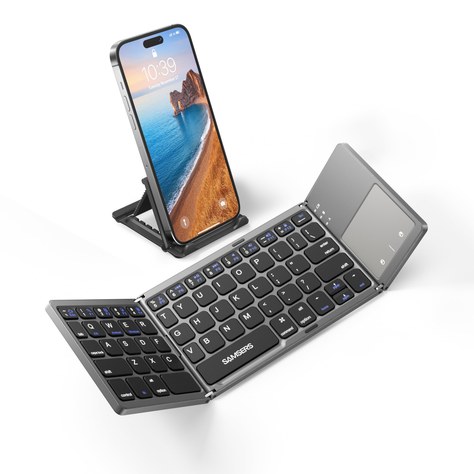
Key specs: tri-fold keyboard with a built-in multi-touch touchpad · opens to 11.9 × 3.9 in, folds to about 6 × 3.8 × 0.7 in · 5.53 oz · Bluetooth 5.1, pairs with up to 3 devices · USB-C charging, up to 48 hours of typing and 560 hours of standby on a 2–3 hour charge · velvet pouch and phone stand included
Price: ~$32–$40 (approx. as of Nov 23, 2026; camelcamelcamel shows $39.99 on Nov 19 with a $32.90 average, and Samsers sells it for $31.99 on its own site; prices change)
Who it’s for: iPad owners who want one small device that handles typing and pointing, so they can write emails on a plane or at a café without reaching up to tap the screen.
Why we picked it
- It has about 4,000 ratings at roughly 4.3 stars, the most of any touchpad folding keyboard we found under $40.
- At 5.53 oz it is the lightest pick here, and it folds to about the footprint of a large phone.
- The touchpad works as a pointer on iPadOS 13.4 and later, so you can select text, scroll and click without lifting your hand.
Watch-outs: The keys are a little smaller than a laptop’s, and the fold runs between the keys, so give yourself a day to adjust. If the touchpad does not move the cursor on your iPad, Samsers says to turn on Settings > Accessibility > Touch > AssistiveTouch. Price has drifted toward $40 lately; watch for it near $32.
2. ProtoArc XK01 Tri-Fold Keyboard: Best Full-Size with Number Pad
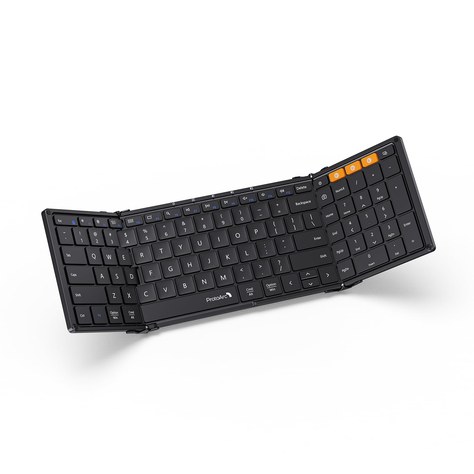
Key specs: 105 keys with 0.65 in keycaps, a function row, arrow keys and a number pad · opens to about 15.2 in wide, folds to 8.5 × 4.7 × 0.8 in · 10.5 oz · aluminum hinges rated for 10,000+ folds · Bluetooth 5.1, 3 devices · 210 mAh battery with USB-C charging, up to 150 days of standby · 2-year limited warranty
Price: ~$36–$40 (approx. as of Nov 23, 2026; $39.99 on a recent Amazon listing, and ProtoArc’s own store shows $35.99; other colors and listings run higher; prices change)
Who it’s for: People who do real work on an iPad, like budgets in Numbers or Excel, invoices or long documents, and want a keyboard that feels like a full desktop layout when it is open.
Why we picked it
- It is the only pick with full-size 0.65 in keycaps and a separate number pad, so typing speed stays close to a laptop.
- It has about 3,500 ratings at roughly 4.3 stars.
- It has 12 shortcut keys for iPad and iPhone, including Home, Search, app switching, screenshot and lock, through the Fn layer.
- Its 2-year warranty is tied for the longest in this list.
Watch-outs: Folded, it is about 8.5 in long and 10.5 oz, so it fits a bag or a large jacket pocket, not a jeans pocket. It is not backlit and has no touchpad. It is Bluetooth only, with no USB receiver or wired mode.
3. iClever BK06 Foldable Keyboard: Best Ergonomic Split Layout
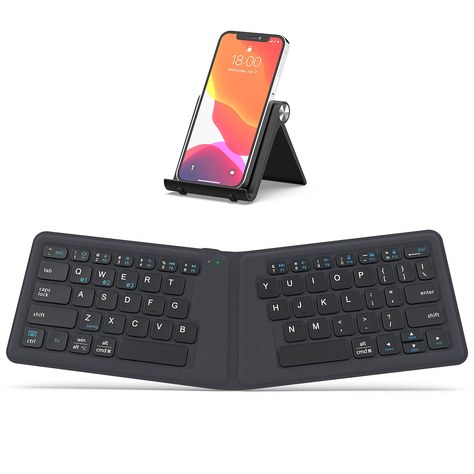
Key specs: 64-key split-V layout at a 166-degree angle · full-size U-shaped scissor-switch keys · folds in half to about 6.6 × 4.1 × 0.6 in, 12 mm thick when open · 6.2 oz with a PU leather cover · Bluetooth, 3 devices · USB-C charging, up to 40 hours of typing and 30 days of standby · fold to turn off, unfold to turn on · 12-month warranty
Price: ~$33–$38 (approx. as of Nov 23, 2026; $37.99 on a recent Amazon listing, $39.99 on iClever’s store and $32.99 at another retailer; prices change)
Who it’s for: Writers, students and remote workers who type for an hour or more at a time and want their wrists angled more naturally than on a flat travel keyboard.
Why we picked it
- The split-V shape lets your hands sit at a natural angle, which many owners find easier on the wrists for long sessions.
- It has about 1,900 ratings at roughly 4.4 stars, tied for the highest score of our picks.
- It folds in half instead of in thirds, so there is no seam running through the middle of the letter keys.
Watch-outs: There is no function row, so media and screen controls use the Fn layer. The split layout takes a few days to learn if you type T, G and B with your right hand. It has no number pad or touchpad. Stock on Amazon has come and gone over the past year, so check that it is sold new.
4. OMOTON Foldable Keyboard with Number Pad: Best Budget
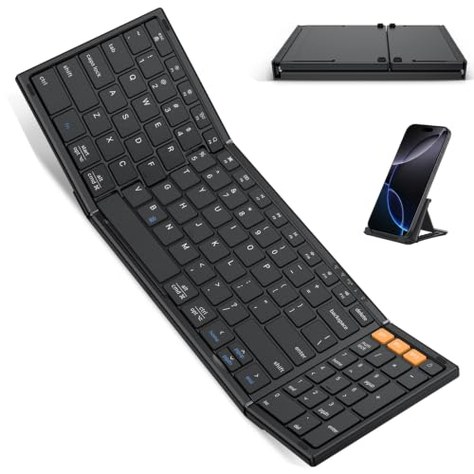
Key specs: full-size 104-key tri-fold layout with a number pad · folds to 7.24 × 4.52 × 0.43 in, the thinnest of our picks when folded · Bluetooth, 3 devices · rechargeable, about 2 hours to charge, up to 90 days of standby, sleeps after 30 minutes · phone stand included · 12-month warranty
Price: ~$26–$30 (approx. as of Nov 23, 2026; camelcamelcamel shows $28.45 on Nov 20, a $25.59 low in June 2026 and a $30.07 average; prices change)
Who it’s for: Anyone who wants a full folding layout with a number pad for the least money, such as students, travelers who use the iPad a few times a week, or anyone buying a spare keyboard for a second bag.
Why we picked it
- It is the cheapest pick, often about $10 less than the ProtoArc, and still has a number pad and three-device pairing.
- At about 0.43 in thick folded, it slides into a thin laptop sleeve or the back pocket of an iPad case.
Watch-outs: It is a newer listing with about 160 ratings at roughly 4.4 stars, so there is far less long-term feedback than for the other picks, and a few owners report keys failing after several months. The listing does not give a weight or a full list of iPad shortcut keys. It has no touchpad.
5. seenda Tri-Fold Keyboard with Touchpad: Best Budget Touchpad Alternative
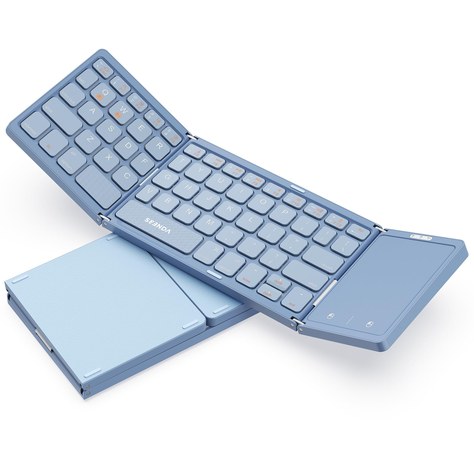
Key specs: tri-fold keyboard with a touchpad and two physical click buttons · opens to 11.96 × 3.86 × 0.39 in, folds to 5.98 × 3.86 × 0.78 in · magnets hold it shut · Bluetooth 5.1, 2 devices · 140 mAh battery with USB-C charging, about 2 hours to charge, roughly 200 hours of standby · 2-year warranty under seenda’s policy for authorized sellers
Price: ~$28–$35 (approx. as of Nov 23, 2026; The Gadgeteer listed it at $33.99, and camelcamelcamel has tracked it between $27.98 and $39.99 with a $33.78 average; prices change)
Who it’s for: iPad users who want a touchpad but would rather press real left and right buttons than tap a small pad, and who mostly switch between just two devices.
Why we picked it
- It is often a few dollars cheaper than the Samsers and still includes a touchpad that supports gestures like swipe, scroll and pinch-to-zoom.
- The two physical click buttons make drag-and-drop and text selection easier than tap-to-click.
- It has about 900 ratings at roughly 4.2 stars, and a hands-on review at The Gadgeteer found it worked well across a phone, a Surface tablet and a laptop.
Watch-outs: It only remembers two devices. The fold sits between the R and T keys, so some left-hand keys are narrower, which takes getting used to. Reviews of seenda’s folding keyboards are mixed: one reviewer at Tom’s Guide found a related seenda model’s keys loud and its touchpad hard to use. The listing does not give a weight.
How to choose a foldable keyboard for an iPad
1. Decide if you need a touchpad
Since iPadOS 13.4, iPads support a pointer, so a keyboard with a built-in touchpad (Samsers, seenda) lets you select text, scroll and click without touching the screen. If you mostly type and then tap the screen to send, a keyboard without a touchpad is lighter on the wallet and usually has bigger keys.
2. Pick a layout: pocket, full-size or split
Pocket tri-fold keyboards (Samsers, seenda) fold to about the size of a phone, but shrink the edge keys and put a seam through the letters. Full-size tri-folds (ProtoArc, OMOTON) add a number pad and full-size keys, but fold to about 7–8.5 in long. A split-V layout (iClever BK06) folds in half and angles your wrists.
3. Check multi-device pairing
Most of these keyboards remember three devices and switch with an Fn key combination, so you can answer a text on your iPhone and jump back to the iPad. The seenda remembers two. If you also want to use the keyboard on a Mac at your desk, see our wireless keyboard and mouse combos for Mac guide for desk-friendly options.
4. Look for iPad shortcut keys
Good folding keyboards include an Fn layer with iPad-friendly keys like Home, Search, app switching, screenshot, volume and lock. The ProtoArc lists 12 of them. On any keyboard, hold the Command key on the iPad to see the shortcuts the current app supports, and use Command + Space for Spotlight search.
5. Plan where the iPad will stand
A keyboard does not hold the iPad up. A folio case with a kickstand works, but on a tray table or café counter a small folding stand is steadier. For a full-size iPad, our best tablet stands under $40 guide includes a foldable stand that weighs a few ounces.
FAQ
Do foldable Bluetooth keyboards work with an iPad?
Yes. Any of these keyboards pairs through Settings > Bluetooth on the iPad, with no app needed. Turn the keyboard on, put it in pairing mode, tap its name and type any code shown. They work with every recent iPad, iPad Air, iPad mini and iPad Pro running a current version of iPadOS.
Can I use one keyboard for my iPhone and iPad?
Yes, if it supports multi-device pairing. The Samsers, ProtoArc, iClever and OMOTON each remember three devices, and the seenda remembers two. Pair each device once, then press the Fn key combination for that channel to switch in a second or two.
Does the touchpad on a foldable keyboard work with an iPad?
Usually yes, on iPadOS 13.4 or later, which added pointer support. The Samsers and seenda touchpads move the iPad’s round pointer and can scroll. If the pointer does not appear, Samsers says to turn on AssistiveTouch under Settings > Accessibility > Touch. Some cheap folding keyboards say their touchpad does not support iOS, so check the listing.
Do foldable keyboards work on a plane?
Yes. Bluetooth accessories are generally allowed in flight once the crew allows electronics, and these keyboards are small enough for a tray table. The pocket models fit best in an economy seat. Keep it on the tray, not your lap, because tri-fold hinges flex.
Quick takeaway
For most iPad owners, buy the Samsers KT03: it types, points and fits in a pocket for about $32–$40. Get the ProtoArc XK01 for full-size keys and a number pad, the iClever BK06 for long typing sessions, the OMOTON for the lowest price, and the seenda if you want a touchpad with real click buttons for less.
Next reads: Best Tablet Stands Under $40 (2026) to prop the iPad up at a good angle, and Best Wireless Keyboards Under $40 (2026) for a keyboard that stays on your desk.


Leave a Reply