Disclosure: Smart Gear Picks earns a commission from qualifying Amazon purchases made through links on this page, at no extra cost to you. Prices are approximate, based on Amazon listing, manufacturer and price-tracker sources, and they change often. Check the current price on Amazon before buying.
Prices checked on November 13, 2026 (approximate; prices change)
You got a big monitor for the home office, went to plug in your MacBook Air, and found no HDMI port. Or you walked into a conference room with two minutes to spare and a laptop with nothing but USB-C. A USB-C to HDMI adapter is the cheapest fix in tech, but cheap ones are where people get burned: a laggy 30Hz picture, a second monitor that only mirrors, or a dongle that blocks the port you needed for charging.
This guide compares five real USB-C to HDMI adapters and cables that typically sell for about $8–$20 on Amazon US: a small 4K@60Hz adapter for most people, a 6.6 ft direct cable that skips the dongle entirely, a bargain adapter for your laptop bag, a cable with 100W charging pass-through for two-port MacBook Airs, and a mini hub that adds a USB-A port. If you need SD, Ethernet and more USB ports too, our USB-C hubs for MacBook Air under $50 guide is the better place to start.
Quick picks
- Best Overall: Anker 310 USB-C to HDMI Adapter, 4K@60Hz (~$15–$18)
- Best Direct Cable for a Desk Monitor: UGREEN USB-C to HDMI 2.0 Cable, 6.6 ft (~$12–$15)
- Best Cheapest: BENFEI USB-C to HDMI Adapter, 4K@60Hz (~$7–$9)
- Best if You Need to Charge While Connected: UGREEN USB-C to HDMI Cable with 100W PD (~$19–$22)
- Best for an Extra USB-A Port (4K@30Hz): Acer 3-in-1 USB-C to HDMI Adapter with 100W PD (~$15–$19)
Comparison table
| Adapter / cable | Price | Type / connector | Max resolution & refresh | HDR | Charging pass-through | Cable length | Warranty | Best for |
|---|---|---|---|---|---|---|---|---|
| Anker 310 USB-C to HDMI Adapter (A8312) | ~$15–$18 | Adapter: USB-C plug to HDMI socket | 4K@60Hz (2K@60Hz on iPad Pro per listing) | Not listed | No | ~0.5 ft built-in braided | 18 months | Most MacBook owners with an HDMI cable already |
| UGREEN USB-C to HDMI 2.0 Cable (50571) | ~$12–$15 | Direct cable: USB-C plug to HDMI plug | 4K@60Hz · 2K@120Hz | Yes (HDCP 2.2) | No | 6.6 ft (2 m) braided | UGREEN support (see listing) | A desk monitor with one tidy cable |
| BENFEI USB-C to HDMI Adapter | ~$7–$9 | Adapter: USB-C plug to HDMI socket | 4K@60Hz · 2K@144Hz | Not listed | No | Short built-in (length not listed) | 18 months | Lowest price; spare for a laptop bag |
| UGREEN USB-C to HDMI Cable with 100W PD (CM675) | ~$19–$22 | Direct cable with USB-C charging socket at the HDMI end | 4K@60Hz · 2K@120Hz · 1080p@240Hz | Yes (HDR10, HDCP 2.2) | Yes, up to 100W | 6.6 ft (79 in) | 24 months | Two-port MacBook Air, iPhone or iPad that needs power |
| Acer 3-in-1 USB-C to HDMI Adapter (ODK3A0) | ~$15–$19 | Mini hub: HDMI + USB-A 5Gbps + USB-C PD in | 4K@30Hz | Not listed | Yes, up to 100W | Short built-in (about 9.8 in overall) | 1 year | Presentations, TVs, a USB-A stick or mouse |
Specs are from Amazon US listing details pulled on November 13, 2026. “Not listed” means the listing does not state it, not that the feature is missing. Prices are approximate and change often.
1. Anker 310 USB-C to HDMI Adapter: Best Overall
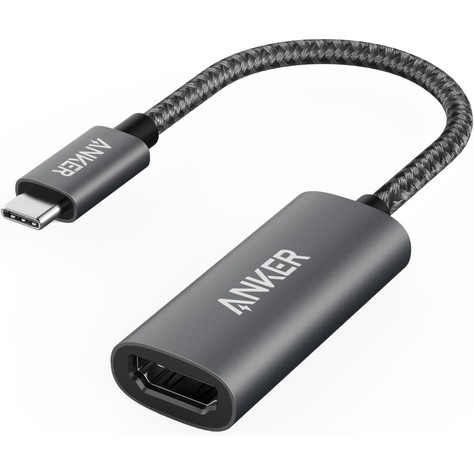
Key specs: USB-C plug to full-size HDMI socket · up to 4K@60Hz · works with USB-C DisplayPort Alt Mode, USB4 and Thunderbolt ports · aluminum housing with a braided nylon cable about 0.5 ft long · about 18 g · no charging or Power Delivery · 18-month warranty (model A8312)
Price: ~$15–$18 (approx. as of Nov 13, 2026; about $16.99 on Amazon; prices change)
Who it’s for: You already have an HDMI cable running to your monitor or TV, and you just need the MacBook end to fit.
Why we picked it
- It has the biggest review base of anything we checked, about 37,800 ratings at roughly 4.6 stars, with 10K+ bought in the past month per the listing.
- It does 4K@60Hz, which is the setting that makes a 4K monitor feel smooth on a Mac instead of laggy.
- The short braided pigtail takes strain off your Mac’s port when the HDMI cable gets tugged.
Watch-outs: It has no pass-through charging. On a MacBook Air with only two USB-C ports and no MagSafe (the M1 model), it takes half your ports. Anker’s listing notes that iPad Pro tops out at 2K@60Hz with this adapter, and 4K@60Hz also needs an HDMI cable and monitor input that can handle it. The listing does not mention HDR.
2. UGREEN USB-C to HDMI 2.0 Cable (6.6 ft): Best Direct Cable
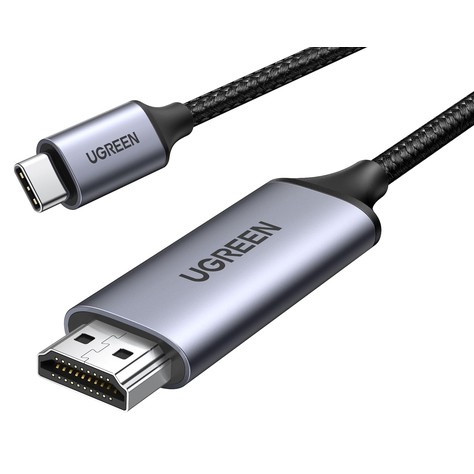
Key specs: One-piece cable, USB-C plug on one end and HDMI plug on the other · 4K@60Hz, also 2K@120Hz and 1080p · USB-C side DisplayPort 1.2 and HDCP 2.2; HDMI side supports HDR, 3D and HDCP 2.2/1.4 · 6.6 ft (2 m) braided nylon · aluminum plug housings · works with Thunderbolt 5/4/3 and DP Alt Mode USB-C · one-way only, USB-C to HDMI (model 50571)
Price: ~$12–$15 (approx. as of Nov 13, 2026; about $12.99 on Amazon, list $14.99; prices change)
Who it’s for: Your MacBook lives on a desk next to one monitor, and you would rather run one cable than a dongle plus an HDMI cable.
Why we picked it
- No dongle means one less joint to wiggle loose, and it often costs less than an adapter plus an HDMI cable.
- It is an Amazon’s Choice pick with about 12,600 ratings at roughly 4.6 stars, and the listing spells out HDR and HDCP 2.2 support.
Watch-outs: It only works one way: USB-C laptop to HDMI screen. 6.6 ft is a fixed length, so measure first if your monitor sits on a far shelf or a TV across the room. The listing we pulled does not state the warranty length.
3. BENFEI USB-C to HDMI Adapter: Best Cheapest
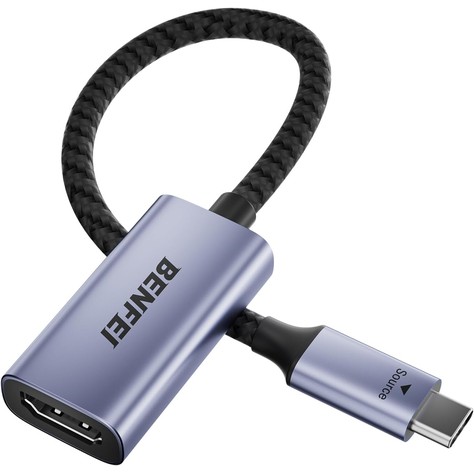
Key specs: USB-C plug to HDMI socket · up to 3840 × 2160 at 60Hz, plus 2K@144Hz, 1080p and lower · aluminum housing, braided cable with molded strain relief · 18-month warranty
Price: ~$7–$9 (approx. as of Nov 13, 2026; about $7.99 on Amazon; prices change)
Who it’s for: You want a cheap spare in your laptop bag for conference rooms, hotel TVs and classrooms.
Why we picked it
- At about $8 it costs half as much as the Anker, yet the listing still claims 4K@60Hz and 2K@144Hz.
- It is an Amazon’s Choice pick with about 17,100 ratings at roughly 4.4 stars and 8K+ bought in the past month, so it is not a gamble on an unknown brand.
Watch-outs: The listing does not mention HDR, does not give the cable length (it is a short pigtail), and has no charging pass-through. Test it the week it arrives, not the morning of a big presentation.
4. UGREEN USB-C to HDMI Cable with 100W PD: Best if You Need to Charge
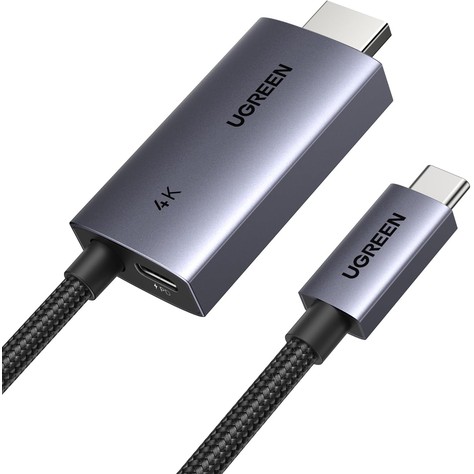
Key specs: 6.6 ft (79 in) USB-C to HDMI cable with a female USB-C charging socket built into the HDMI end · up to 100W Power Delivery pass-through to your laptop, phone or tablet · 4K@60Hz, 2K@120Hz, 1080p@240Hz · HDR10, HDCP 2.2/1.4, 3D · aluminum and braided nylon · one-way, USB-C to HDMI · 24-month UGREEN warranty (model CM675)
Price: ~$19–$22 (approx. as of Nov 13, 2026; about $19.99 on Amazon, list $25.99; prices change)
Who it’s for: You use an M1 MacBook Air (two USB-C ports, no MagSafe) and do not want the display to eat your charging port. Also handy for an iPhone 15 or later, an iPad or a Steam Deck on a TV.
Why we picked it
- Video and power go through one USB-C port, so your Mac’s other port stays free.
- You still get full 4K@60Hz with HDR10 and a 24-month warranty, and it is the only cable here with up to 100W pass-through.
Watch-outs: You need your own USB-C charger and cable for the charging socket; neither is included. It has the fewest ratings of our picks (about 770 at roughly 4.2 stars), and the list price can go over $25, so watch for the sale price. UGREEN notes the wide plugs may not seat through a thick phone case, some copy-protected apps will not play over it, and it does not support Nintendo Switch 2.
5. Acer 3-in-1 USB-C to HDMI Adapter: Best for an Extra USB-A Port
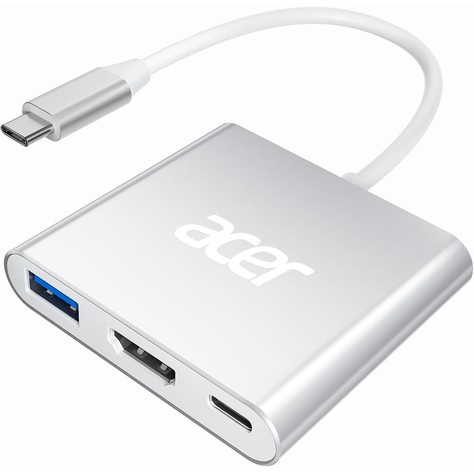
Key specs: Compact aluminum mini hub on a short built-in cable (about 9.8 in overall) · one HDMI port at 4K@30Hz · one USB-A 3.0 data port at 5Gbps (no charging from the USB-A port) · one USB-C PD input, up to 100W, for charging the host only · about 44 g · 1-year warranty (model ODK3A0)
Price: ~$15–$19 (approx. as of Nov 13, 2026; about $15.98 on Amazon, list $18.99; prices change)
Who it’s for: You mostly plug into TVs and projectors, and you also want a USB-A port for a flash drive or mouse receiver, plus charging, from one USB-C port.
Why we picked it
- Three ports for under $20: HDMI, USB-A and USB-C charging pass-through, from a brand most people know.
- It is an Amazon’s Choice pick at about 4.3 stars from 2,900+ ratings, with 4K+ bought in the past month and a #12 rank in USB Hubs at the time we checked.
Watch-outs: HDMI is capped at 4K@30Hz. That is fine for a TV, a projector or a 1080p monitor, but on a 4K desk monitor the mouse and scrolling will feel choppy. Acer says the USB-C port is for charging only (no data), it does not support portable monitors, and you should use a 45W or stronger charger for good charging speed.
How to choose a USB-C to HDMI adapter for a MacBook
1. 4K@60Hz vs 4K@30Hz: the spec that matters most
Plenty of adapters say “4K,” but 4K at 30Hz updates the screen half as often as 4K at 60Hz. On a desk monitor that shows up as a laggy mouse pointer and juddery scrolling. For a 4K monitor, buy an adapter or cable rated for 4K@60Hz, which needs an HDMI 2.0 chip inside. Use a Premium High Speed (18Gbps) HDMI cable and a monitor input that supports 4K@60Hz. A 4K@30Hz adapter like the Acer is fine for 1080p screens, TVs and projectors.
2. Base M1 and M2 MacBook Air: one external display only
Apple says the M1 and M2 MacBook Air support one external display, lid open or closed. A cheap “USB-C to dual HDMI” adapter will not add a second extended screen; on a Mac it usually just mirrors. The M3 MacBook Air supports a second external display only with the lid closed, and Apple says M4 and M5 MacBook Air models support two external displays with the lid open. On M1 or M2, the workaround for two monitors is a DisplayLink adapter or dock, which sends video over USB using the DisplayLink Manager app. Expect to pay more than $25.
3. Any USB-C or Thunderbolt port works on Apple silicon Macs
All five picks need a USB-C port with DisplayPort Alt Mode. Every Thunderbolt and USB4 port on an Apple silicon MacBook Air or MacBook Pro has it, so any port will do. If you have a 14-inch or 16-inch MacBook Pro from 2021 or later, check the side first: it has a built-in HDMI port, so you may only need a regular HDMI cable. Apple lists the M1 Pro and M1 Max models at up to 4K@60Hz over that port, and M2 Pro and later models at up to 8K@60Hz or 4K@240Hz.
4. Do you need charging pass-through?
The M2 and later MacBook Air charge through MagSafe, so a plain adapter only costs you one USB-C port and you still have one free. The M1 MacBook Air has no MagSafe and just two USB-C ports, so a plain adapter plus a charger uses everything. That is when the UGREEN 100W PD cable or the Acer 3-in-1 earns its price. Use a charger of about 45W or more.
5. HDCP and streaming apps
HDCP is the copy protection streaming services use. If a movie plays on your laptop but shows a black box on the TV, the adapter, cable or TV input is the usual suspect. Both UGREEN listings call out HDCP 2.2.
6. iPad and iPhone 15 or later
USB-C iPads and iPhone 15 or later can send video to an HDMI screen through these adapters; the UGREEN and BENFEI listings name recent iPhones. Some streaming apps block it, and the UGREEN 100W PD cable keeps the battery up during long sessions.
FAQ
Does a USB-C to HDMI adapter work with a MacBook Air?
Yes. Every Apple silicon MacBook Air has USB-C or Thunderbolt ports with video out, so a standard USB-C to HDMI adapter works with no drivers. Remember the M1 and M2 Air support only one external display.
Why is my MacBook only showing 30Hz on my 4K monitor?
Usually the adapter or cable is limited to 4K@30Hz, or your HDMI cable is an older type that cannot carry 4K@60Hz. Check that the adapter is rated for 4K@60Hz (HDMI 2.0), use a High Speed or Premium High Speed HDMI cable, and then open System Settings > Displays and pick 60Hz from the refresh rate menu.
Can I connect two monitors to my MacBook Air with a USB-C to dual HDMI adapter?
On M1 and M2 MacBook Air models, not as two separate screens with a normal adapter. Apple supports one external display on those models, and macOS does not split one USB-C port into two independent HDMI screens the way some Windows laptops do. You would need a DisplayLink adapter or dock. M4 and M5 Air models support two, one per port.
Quick takeaway
For most MacBook owners, the Anker 310 USB-C to HDMI Adapter is the safe 4K@60Hz pick with an 18-month warranty. Choose the UGREEN 6.6 ft USB-C to HDMI cable for a clean one-cable desk setup, the BENFEI adapter if you want a cheap spare for your bag, the UGREEN 100W PD cable if you have an M1 Air or need to charge while connected, and the Acer 3-in-1 if a TV or projector at 4K@30Hz is fine and you want a USB-A port too.
Next reads: Best USB-C Hubs for MacBook Air Under $50 (2026) if you need HDMI plus SD, Ethernet and more ports from one plug, and Best Wireless Keyboard and Mouse Combos for Mac Under $60 (2026) to finish the desk setup once your MacBook is driving a big screen.


Leave a Reply