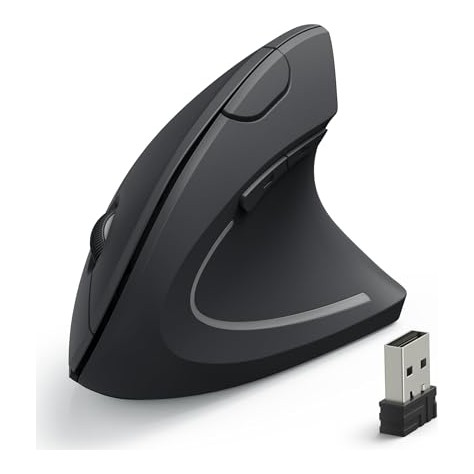
Disclosure: Smart Gear Picks earns a commission from qualifying Amazon purchases made through links on this page, at no extra cost to you. Prices are approximate, based on manufacturer, review and price-tracker sources, and they change often. Check the current price on Amazon before buying.
Prices checked on November 9, 2026 (approximate; prices change)
It usually starts as a dull ache on the outside of the wrist around 3 p.m. By Thursday it is there when you wake up. You raised the monitor and bought a gel wrist pad, but your mouse hand still sits palm-down all day, forearm twisted flat. A vertical mouse turns that hand roughly 50–60 degrees onto its side, into a “handshake” grip, so the two forearm bones are not crossed and you push with the arm instead of flicking from the wrist. For many desk workers that one change makes the afternoon ache noticeably quieter, and it does not cost $70 to try.
This guide covers five real vertical ergonomic mice that typically sell for under about $40 on Amazon US: wireless, rechargeable, Bluetooth multi-device, wired with a palm rest, and a true left-handed option. If you just want a good regular mouse, our Best Wireless Mice Under $40 roundup covers flat and multi-device picks.
Health note: this is buying advice, not medical advice. A vertical mouse is a comfort and posture tool. It does not treat carpal tunnel syndrome, tendinitis or any other condition. If you have numbness, tingling, weakness or pain that keeps you up at night, see a doctor or physical therapist.
Quick picks
- Best Overall: Anker 2.4G Wireless Vertical Ergonomic Mouse (~$18–$30)
- Best Rechargeable + Quiet Clicks: Lekvey Rechargeable Vertical Wireless Mouse (~$20–$30)
- Best for Bluetooth / Multiple Devices: TECKNET MS007 Rechargeable Vertical Mouse (~$25–$30)
- Best Wired with Palm Rest: J-Tech Digital V628 Scroll Endurance (~$22–$28)
- Best Left-Handed: Perixx PERIMICE-713L (~$18–$25)
Comparison table
| Mouse | Price | Connection / power | Key specs | Warranty | Best for |
|---|---|---|---|---|---|
| Anker 2.4G Vertical (AK-98ANWVM-UBA) | ~$18–$30 | 2.4 GHz USB-A receiver · 2× AAA | 800/1200/1600 DPI · 5 buttons · 3.4 oz · 120 × 63 × 75 mm | 18 months (Anker) | First vertical mouse; medium-large right hands |
| Lekvey Rechargeable Vertical (7L-01) | ~$20–$30 | 2.4 GHz USB-A receiver · 600 mAh USB-C | 800/1200/1600 DPI · 6 buttons · quiet L/R clicks · 3.36 oz | 36 months (Lekvey) | Rechargeable, quiet office or shared room |
| TECKNET MS007 Rechargeable | ~$25–$30 | Bluetooth 5.0 + 3.0 + 2.4 GHz · USB-C | Up to 4800 DPI (6 levels) · 3 devices · silent L/R · 4.73 × 2.96 × 2.48 in | 36 months (registered) | Laptop + tablet + desktop; Bluetooth-only laptops |
| J-Tech Digital V628 Scroll Endurance | ~$22–$28 | Wired USB-A · 1.6 m cable | 600/1000/1600 DPI · thumb buttons · detachable palm rest · blue LED | Seller / Amazon returns (see J-Tech) | Large hands, no batteries, palm support |
| Perixx PERIMICE-713L | ~$18–$25 | 2.4 GHz USB-A receiver · 2× AAA | Left-handed · up to 1600 DPI · 6 buttons · quiet L/R · rubber coating | 12 months (Perixx) | Left-handed users |
Specs are from manufacturer and Amazon listing details. Warranties are US terms where listed. Prices are approximate and change often. Logitech Lift (~$70) is the well-known premium vertical mouse, but it is well over this $40 budget, so it is not ranked here.
1. Anker 2.4G Wireless Vertical Ergonomic Mouse: Best Overall
Key specs: Right-handed vertical “handshake” shape · 2.4 GHz wireless via a USB-A nano receiver that stores in the base (not Bluetooth) · 800/1200/1600 DPI button · 5 buttons including back/forward · 2× AAA batteries (not included) · sleeps after 8 minutes idle · 120 × 62.8 × 74.8 mm, about 3.4 oz · 18-month Anker warranty
Price: ~$18–$30 (approx. as of Nov 9, 2026; Amazon list around $29.99, frequently discounted into the high teens or low $20s; prices change)
Who it’s for: You have never tried a vertical mouse, you have medium to large hands, and you want the cheapest well-proven way to find out if the handshake grip helps your wrist.
Why we picked it
- It is the most-reviewed budget vertical mouse on Amazon, with more than 53,000 ratings around 4.2 stars.
- The shape is simple and natural: the hand rests on its side, the thumb sits in a groove with the back/forward buttons, and the scroll wheel and clicks fall under the index and middle fingers.
- Plug-and-play 2.4 GHz with no software makes it easy on a locked-down work laptop.
Watch-outs: It runs on AAA batteries, and a noticeable share of reviewers say it goes through them faster than a regular mouse. Scroll-wheel wear after a year or so is the most common complaint. It is not for small hands (people with hands under about 6.5 inches often find it too big), and it has no Bluetooth, so USB-C-only MacBooks need an adapter. Clicks are normal volume, not silent.
2. Lekvey Rechargeable Vertical Wireless Mouse: Best Rechargeable + Quiet Clicks
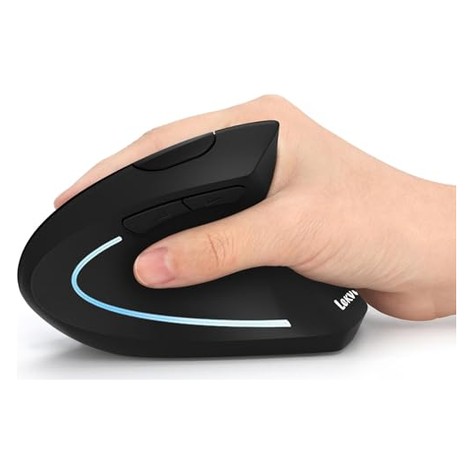
Key specs: Right-handed vertical design (model 7L-01) · built-in 600 mAh battery charged over USB-C (150 cm cable included) · Lekvey rates a full charge at about 3–4 weeks with 8–10 hours of daily use · 2.4 GHz USB-A receiver stored in the base · 800/1200/1600 DPI · 6 buttons, back/forward work on Mac per the listing · quiet left/right clicks · 5.0 × 3.0 × 2.5 in, 3.36 oz · 36-month Lekvey warranty
Price: ~$20–$30 (approx. as of Nov 9, 2026; recently around $29.99 on Amazon, with regular coupons and deals; prices change)
Who it’s for: You like the Anker idea but hate buying batteries, and you share a room, an office or a late-night desk where loud clicks bother people.
Why we picked it
- USB-C recharging means roughly one charge a month, and you can keep working while it charges.
- Quiet main clicks are a real difference at this price.
- It has a strong review base (15,000+ ratings around 4.3 stars) and a 36-month warranty.
Watch-outs: Like the Anker, it is sized for medium to large hands. Lekvey sells a separate small-hands model, so check the listing title before you buy. Reviews flag scroll-wheel issues and some batteries that stop holding a charge after months of use, so keep the warranty info. The lightweight base can tip if you reach hard for the thumb buttons. It uses a USB-A receiver, not Bluetooth.
3. TECKNET MS007 Rechargeable Vertical Mouse: Best for Bluetooth and Multiple Devices
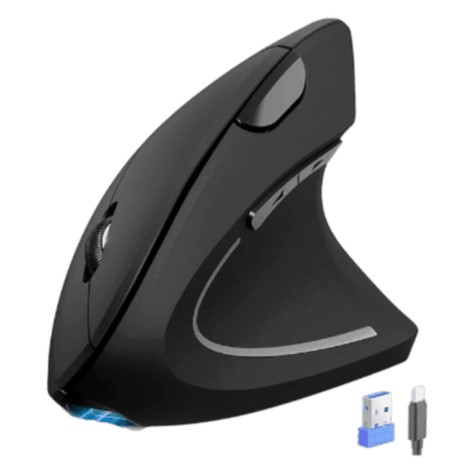
Key specs: Right-handed vertical design for medium to large hands · tri-mode connection: Bluetooth 5.0 + Bluetooth 3.0 + 2.4 GHz USB-A receiver, switch between 3 devices with a button underneath · rechargeable over USB-C, rated about 1–2 months per 1.5-hour charge · 6 DPI levels from 800 to 4800 · silent left/right clicks · 4.73 × 2.96 × 2.48 in, about 4.2 oz · 36-month TECKNET warranty (registration required)
Price: ~$25–$30 (approx. as of Nov 9, 2026; about $27.99 on Amazon and $29.99 at TECKNET; prices change)
Who it’s for: You bounce between a work laptop, a personal laptop and a tablet, or your laptop only has USB-C ports and you would rather use Bluetooth than carry a dongle adapter.
Why we picked it
- Bluetooth plus a receiver is rare under $30 in a vertical mouse. Pair two devices over Bluetooth and a third with the receiver, then switch with one button.
- Rechargeable, quiet main clicks and a wide DPI range make it a good fit for a large or high-resolution monitor, where 1600 DPI can feel slow.
- The listing has thousands of ratings around 4.4 stars.
Watch-outs: The side back/forward buttons do not work on macOS, and no buttons are programmable. Some owners say the base is narrow enough to knock over, and fit reviews are split: some large-handed users find it small. Only the left and right clicks are silent. The mode, DPI and side buttons still click. Confirm the listing says rechargeable plus Bluetooth (MS007).
4. J-Tech Digital V628 Scroll Endurance: Best Wired with Palm Rest
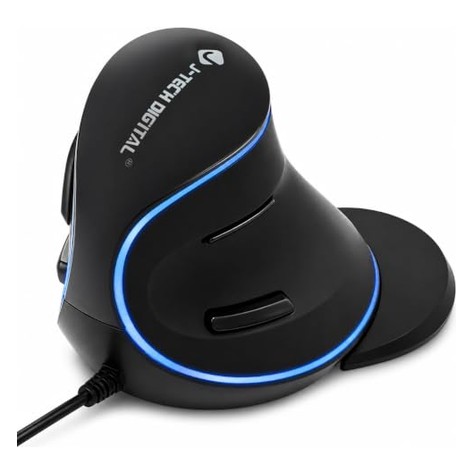
Key specs: Wired USB-A, 1.6 m cable · tall right-handed vertical body with a detachable palm rest that supports the side of the hand and cuts desk drag · DPI button with 600/1000/1600 (listings vary) · two thumb back/forward buttons · blue LED trim · 148 × 95 × 99 mm · no batteries to charge or replace
Price: ~$22–$28 (approx. as of Nov 9, 2026; about $24.99 on Amazon and $27.98 at J-Tech Digital; prices change)
Who it’s for: You have large hands, you want the side of your palm supported instead of dragging on the desk, and you would rather never think about batteries or dongles again.
Why we picked it
- The removable palm rest is the standout. It gives the edge of your hand a ledge to sit on, so you are not pressing the pinky side into the desk all day.
- Wired means zero lag, zero charging and nothing to lose.
- It has 3,000+ ratings around 4.4 stars, and many owners describe it as a cheaper alternative to premium vertical mice.
Watch-outs: It is big and tall, so it can be too large for smaller hands, and some owners bump the thumb buttons by accident. Scroll-wheel wear is the main durability complaint. Side buttons may not work on macOS without extra software. Make sure you select the “Wired” style on the listing if that is what you want.
5. Perixx PERIMICE-713L: Best Left-Handed Vertical Mouse
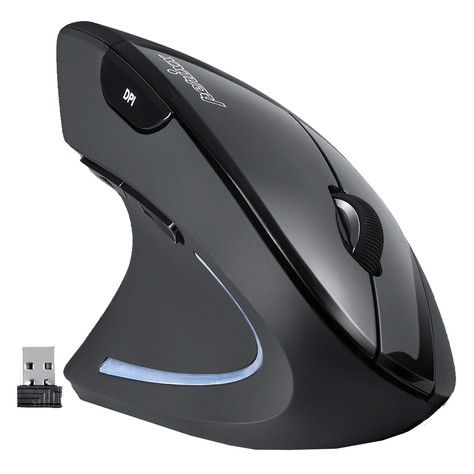
Key specs: True left-handed vertical shape (not just a mirrored flat mouse) · 2.4 GHz USB-A nano receiver with storage slot · 2× AAA batteries (not included) · DPI switch up to 1600 · 6 buttons including back/forward · quiet left/right clicks · soft rubber coating · on/off switch · 12-month Perixx warranty
Price: ~$18–$25 (approx. as of Nov 9, 2026; about $19.99 on Amazon and at Perixx; prices change)
Who it’s for: You mouse with your left hand, or you want to split mousing between hands to give a sore right wrist a break.
Why we picked it
- Left-handed vertical mice are hard to find at any price. Perixx has a dedicated ergonomic line, and the 713L has 2,700+ ratings.
- The shape is close to the Anker, so households or offices can run a right-hand Anker and a left-hand Perixx with the same feel.
- At around $20 it is a cheap way to share the work with your other hand.
Watch-outs: Ratings are lower (about 4.1 stars), with complaints about jittery tracking or scroll wheels after months of use and a few boxes arriving without the receiver, so check the package right away. It runs on AAA batteries. Back/forward buttons do not work on macOS. Right-handers should look at the regular PERIMICE-713 instead.
How to choose a vertical mouse for wrist pain
Check these five things before you order.
1. Measure your hand
Measure from the crease of your wrist to the tip of your middle finger. Most budget vertical mice (Anker, Lekvey, TECKNET, J-Tech) are built for medium to large hands, roughly 7 inches and up. If you are under about 6.5 inches, look for a listing that says “small hands.” A mouse that is too big makes you grip harder.
2. Pick a connection that fits your computer
A USB-A receiver is the simplest option for most Windows PCs. If your laptop only has USB-C, either get a Bluetooth model like the TECKNET or plan on a small USB-C to USB-A adapter.
3. Decide between batteries and recharging
AAA models (Anker, Perixx) are cheap and easy to swap, but they can go through batteries. Rechargeable models (Lekvey, TECKNET) charge over USB-C, and you can keep using them while they charge.
4. Check the Mac and software details
Most budget vertical mice have no companion app, so the buttons cannot be remapped. Several listings say the side buttons do not work on macOS. Lekvey says its side buttons do work on Mac. For a full Mac setup, see our Mac keyboard and mouse combos.
5. Fix the rest of the desk too
A vertical mouse works best when your elbow sits close to your side at roughly 90 degrees, your shoulder is relaxed, and the mouse is right next to the keyboard instead of a long reach away. Our laptop stands under $50 and a smooth desk mat help with both.
FAQ
Do vertical mice help with carpal tunnel?
They can make mousing more comfortable, but they are not a treatment. A vertical grip reduces forearm twisting and can take pressure off the wrist. Small studies and many users report less discomfort, but the research on carpal tunnel outcomes is limited and mixed. If you have numbness, tingling or weakness in your fingers, get it checked by a doctor or physical therapist. Treat it as one part of a better setup, along with breaks and good desk height.
How long does it take to get used to a vertical mouse?
Most people feel reasonably comfortable within a few days, and the manufacturers here say 1–2 weeks to adjust fully. Start with part of the day and move from your elbow, not your wrist.
Is there a good left-handed vertical mouse under $40?
Yes. The Perixx PERIMICE-713L is a real left-handed vertical mouse for around $20. A pricier rechargeable version (PERIMICE-713LR) also exists. Most other budget vertical mice, including the Anker, Lekvey, TECKNET and J-Tech here, are right-handed only.
Are vertical mice good for gaming?
They are fine for casual, strategy and MMO games, but most are not great for fast shooters. The grip changes how you aim, and budget models have basic sensors and polling rates.
Do vertical mice work with a Mac?
Basic pointing, clicking and scrolling work on a Mac with all five picks. The catch is usually the side buttons. Several listings (TECKNET, Perixx) say back/forward do not work on macOS. Also, USB-A receivers need an adapter on USB-C-only MacBooks. A Bluetooth model like the TECKNET avoids the adapter.
Quick takeaway
For most people with a sore mouse wrist, start with the Anker 2.4G Vertical. It is the lowest-risk, best-proven way to try the handshake grip. Pick the Lekvey if you want rechargeable and quiet, the TECKNET MS007 for Bluetooth and multiple devices, the J-Tech V628 for large hands and a palm rest, and the Perixx 713L if you are left-handed. Give your pick a full week, and see a professional if the pain does not ease.
Next reads: Best Wireless Mice Under $40 (2026) for flat, silent and multi-device mice, and Best Wireless Keyboard and Mouse Combos for Mac Under $60 (2026) if you are rebuilding a Mac desk from scratch.


Leave a Reply