Disclosure: This post contains affiliate links. If you buy through a link, Smart Gear Picks may earn a commission at no extra cost to you.
Prices checked on October 26, 2026. Amazon prices change often, so check the current price before you buy.
Picture a sleek glass desk, the kind that looks great in a small apartment, and a new monitor arm still in the box. The arm comes with a C-clamp, the instructions say “tighten firmly,” and the box never mentions glass. A few turns in, there’s a faint tick from the edge, and a week later a crack runs across the top. Thin particleboard fails more quietly: the clamp slowly crushes the board until the arm leans toward the keyboard.
A clamp squeezes a lot of force into a small spot, and glass, thin particleboard and hollow-core tops aren’t built for that. You don’t need a $200 arm to fix it. Below are five picks under $60 that solve the problem three ways: freestanding stands that never touch the edge, a freestanding gas-spring arm, and a budget clamp arm plus a steel reinforcement plate for thin wood desks. The picks are research-based, not hands-on tested: we compared manufacturer specs, desk-thickness ranges, weight ratings, warranties, prices and owner reviews.
Short version: on any glass desk, go freestanding. On a thin wood or particleboard desk, a clamp arm is fine if you add a reinforcement plate.
Quick comparison
| Pick | Best for | Price range | Screen size | Weight capacity | Mounting | Desk thickness | Warranty |
|---|---|---|---|---|---|---|---|
| VIVO STAND-V001H Single Monitor Desk Stand | Glass desks; set-and-forget height | $30–$34 (now $29.99) | 13–32 in (38 in ultrawide) | 22 lb | Freestanding (15.5 x 11 in steel base) | Any (no clamp) | 3 years |
| HUANUO HNTVS29 Freestanding Monitor Stand | Budget; heavy 27–34 in monitors | $20–$30 (now $24.99) | 13–34 in | 44 lb | Freestanding (tempered-glass base) | Any (no clamp) | 1 year |
| VIVO STAND-V001R Pneumatic Arm Desk Stand | Gas-spring arm motion on glass | $54–$60 (now $59.99) | 17–32 in | 4.4–22 lb | Freestanding (12.8 x 9.9 in rotating base) | Any (no clamp) | 3 years |
| WALI GSMP001N Gas Spring Monitor Arm | Thin wood/particleboard desks, paired with a plate | $23–$27 | 13/17–34 in | 26.4 lb flat / 19.8 lb curved | C-clamp or grommet | 0.39–2.76 in | 10 years (per WALI) |
| VIVO STAND-AC01R Steel Reinforcement Plate | Making any C-clamp safer on thin tops | $20–$25 (now $19.99) | n/a (accessory) | Spreads clamp load | Fits most C-clamps | Adds about 0.1 in per plate | 3 years |
Best combo for a thin wood desk: the WALI arm plus the VIVO plate comes to about $45 at today’s prices. All five picks use VESA 75 or 100, so check the four screw holes on the back of your monitor first.
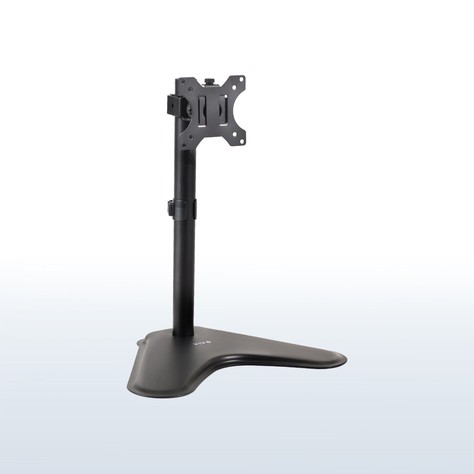
1. VIVO STAND-V001H Single Monitor Desk Stand — Best Overall for Glass Desks
Price: $29.99 on Amazon right now (black; VIVO’s own store lists $33.99, and the white STAND-V001HW is about $39.99)
Key specs: Freestanding steel base, 15.5 x 11 in; 18 in center pole with height adjustment along the pole; fits 13–32 in screens (ultrawide up to 38 in); holds up to 22 lb; VESA 75 x 75 and 100 x 100; +15°/−15° tilt, 90° swivel, 360° rotation for portrait mode; removable VESA plate; integrated cable management; 3-year VIVO warranty.
Who it’s for: Anyone with a glass or thin particleboard desk, or a desk edge nothing can clamp to, who wants the screen higher.
Why we picked it: This is the safest way to get a monitor “arm” on glass: nothing touches the edge, and the weight spreads across a 15.5 x 11-inch steel foot instead of a 2-inch clamp jaw. It has about 5,300 Amazon ratings at 4.5 stars and a three-year warranty. The slide-on VESA plate lets you screw the plate to the monitor first, then hang the screen on the stand.
Watch-outs: Height is set with a hex key, not a spring, so it is a set-it-once stand rather than one you move every hour. The base needs about 11 inches of desk depth. Some owners say a heavy 32-inch screen needs a lot of torque on the screws to stop sagging, and the feet can scratch if you slide it, so lift it to move it.
2. HUANUO HNTVS29 Freestanding Monitor Stand — Best Budget Pick for Heavier Monitors
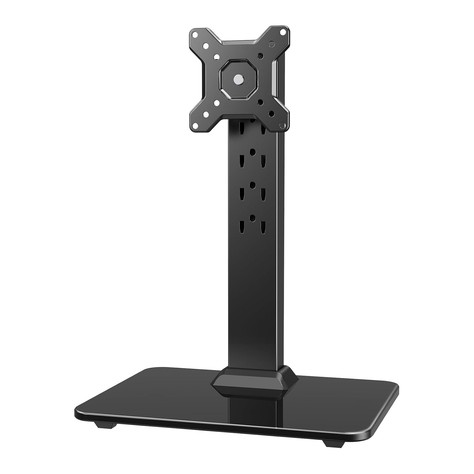
Price: $24.99 on Amazon recently (list $29.99; it has dropped to $19.99–$21.99 several times this year)
Key specs: Freestanding tempered-glass base with anti-slip pads; 17.24 in steel column with 5 height positions (9.27–15.26 in); fits 13–34 in screens; holds up to 44 lb; VESA 75 x 75 and 100 x 100; ±50° swivel, +10°/−15° tilt, 360° rotation; 2 cable clips; model HNTVS29; HUANUO lists a 1-year warranty for monitor stands.
Who it’s for: Budget shoppers with a heavy 27- to 34-inch monitor, and anyone who wants the lowest-cost way to stop clamping anything to a fragile desk.
Why we picked it: At about $25, it carries double the rated load of most stands here (44 lb), and the five fixed height slots make it easy to get the same height every time. It has more than 700 Amazon ratings at about 4.6 stars and is among the top freestanding stands by monthly sales.
Watch-outs: It is a stand, not an articulating arm: it raises, tilts, swivels and rotates, but it does not pull the screen toward you. Height comes in five steps rather than a smooth range. The base is glass on glass if your desk is glass, so stick on all of the included pads and never drag it. The warranty is just one year, the shortest here.
3. VIVO STAND-V001R Pneumatic Arm Monitor Desk Stand — Best Freestanding Gas-Spring Arm
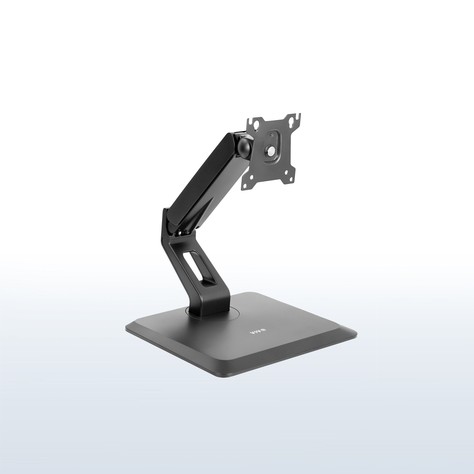
Price: $59.99 on Amazon and on VIVO’s own store (some Amazon sellers list it around $54)
Key specs: Freestanding weighted base, 12.8 x 9.9 in, that rotates; gas-spring (pneumatic) arm with tension adjustment; 11.7 in max extension; screen center adjusts 3–12 in above the desk; fits 17–32 in screens (17–22 in in portrait); holds 4.4–22 lb; VESA 75 x 75 and 100 x 100; +90°/−90° tilt, 80° swivel, 360° rotation; 3-year VIVO warranty.
Who it’s for: Glass-desk owners who want the moving-arm feel: pulling the screen closer for spreadsheets or turning it to share.
Why we picked it: Most gas-spring arms need a clamp, which is exactly what a glass desk can’t take. This one puts a real spring arm on a weighted base, so you get one-hand height and reach changes with nothing gripping the glass. It has about 540 Amazon ratings at 4.3 stars and a three-year warranty.
Watch-outs: The arm tops out low: the screen center reaches only about 12 inches above the desk, which is fine for a 24-inch monitor but can sit low for a 32-inch screen or a tall user. Owners say tension is hard to dial in with very light monitors (stay above 4.4 lb).
4. WALI GSMP001N Gas Spring Single Monitor Arm — Best Clamp Arm for Thin Wood Desks (With a Plate)
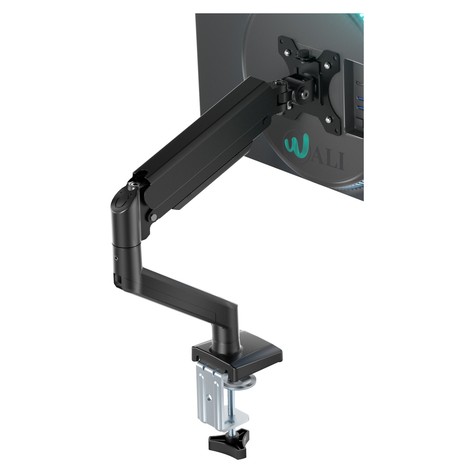
Price: $23.49–$26.99 on Amazon recently (WALI’s own store lists $26.99)
Key specs: Gas-spring arm with C-clamp and grommet bases; desks 0.39–2.76 in thick; fits 13/17–34 in screens (WALI’s listing says both); holds up to 26.4 lb flat or 19.8 lb curved; VESA 75 x 75 and 100 x 100; 19.3 in reach and up to 17.3 in height; +70°/−45° tilt, ±180° swivel, 360° rotation; WALI lists a 10-year warranty.
Who it’s for: People with a thin or soft desk (particleboard, MDF, a 5/8-inch laminate top) who want a true clamp-on arm with the most desk space freed up, and who will add a reinforcement plate.
Why we picked it: It is one of the best-selling budget gas-spring arms on Amazon, with thousands of ratings at about 4.4 stars, and its 26.4 lb rating leaves headroom for a 27- or 32-inch screen. Paired with the VIVO plate below, the full setup is about $45, under our $60 cap, and the clamp grips tops as thin as 0.39 inches.
Watch-outs: Do not clamp this arm directly to glass or to a hollow-core desk, with or without its own pad. On thin particleboard, use a reinforcement plate and tighten only until the arm stops wobbling. The plate uses about 0.2 inches of the clamp range, and the spring must be tuned to your monitor’s weight or it will drift.
5. VIVO STAND-AC01R Steel Reinforcement Plate — Best Reinforcement Plate
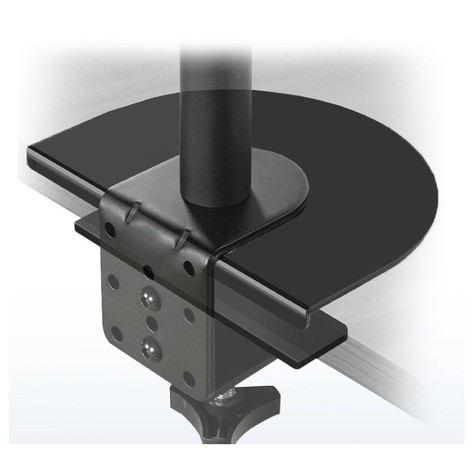
Price: $19.99 on Amazon right now (black; VIVO lists $19.99–$24.99, and the white STAND-AC01RW is about $21.99)
Key specs: All-steel kit: 7.9 x 6.1 in main (top) plate, 6 x 2 in support bracket for under the desk, 0.1 in (2.5 mm) thick; anti-slip padding strip included; fits most C-clamp monitor mounts; 3-year VIVO warranty.
Who it’s for: Anyone clamping an arm to a thin, soft or glass-covered desk, and anyone who already owns a clamp arm and wants to make it safer.
Why we picked it: A clamp puts all of its force on a patch about 2 inches square. The VIVO plate spreads that across 7.9 x 6.1 inches on top, which is what keeps particleboard from crushing and a thin top from bowing over time. It has about 1,400 ratings at 4.7 stars and works with most C-clamps, including the WALI arm above.
Watch-outs: A plate spreads the load but does not make glass strong. Only use it on thick tempered glass (about 3/8 inch or 10 mm, with the safety stamp in a corner), keep it away from corners and edges, and never use it on thin or untempered glass. It is an accessory only, so you still need an arm.
How to choose a monitor arm for a glass or thin desk
Never clamp straight onto glass
A C-clamp works by squeezing, and glass handles a squeeze badly, especially near an edge or a corner, where most cracks start. Even tempered glass is weakest at its edges, right where a clamp jaw sits. That is why many arm makers, HUANUO included, say outright that their clamp arms are not for glass desks. On glass, a freestanding stand or freestanding arm (picks 1 to 3) is the only no-risk option. If you have to clamp, the glass should be tempered and at least about 3/8 inch (10 mm) thick, with a reinforcement plate on top and padding on both sides.
Measure your desk thickness, and check what’s inside it
Measure the top where the clamp would go. Most budget clamps cover about 0.4 to 2.7 inches; the WALI goes from 0.39 to 2.76 inches. Solid wood and thick MDF are fine. Particleboard under about 3/4 inch, hollow-core tops (tap it: a drum sound means hollow), and desks with a thin top over a metal frame all need a reinforcement plate, or a freestanding stand instead.
Know what a reinforcement plate does (and doesn’t do)
A steel plate like the VIVO STAND-AC01R sits between the clamp and the desk and spreads the force over a much larger area: about 48 square inches on top instead of a few. That stops particleboard from being crushed and keeps a thin top from bowing as the arm leverages it over months. It is cheap insurance on thin wood, but only a partial fix on glass.
Check VESA 75 or 100 and the real weight of your monitor
Every pick here takes VESA 75 x 75 mm or 100 x 100 mm, the four-hole pattern on the back of most 22- to 32-inch monitors. Some slim and Apple displays have no VESA holes and need an adapter. Look up the weight of the monitor without its stand, then leave some margin: a 27-inch screen is usually 8 to 13 lb, and many 32-inch screens are 13 to 20 lb.
Gas spring vs. fixed height
A gas-spring arm (VIVO V001R, WALI) lets you move the screen with one hand and holds it wherever you let go, as long as the tension matches the monitor’s weight. A fixed stand (VIVO V001H, HUANUO) is set once with a key or a pin and stays there. If you move the screen often, go gas spring; if you just want it higher and steady, a fixed stand is cheaper.
Plan your cable management
All five picks route cables along the pole or arm with clips or channels. On glass, every cable shows through the top, so run them down the back of the stand. Our Best Cable Management Kits Under $30 has no-drill clips and sleeves that work on glass.
FAQ
Can you put a monitor arm on a glass desk?
Yes, but the safest way is a freestanding arm or stand that sits on the glass instead of clamping it. A clamp arm is only reasonable on tempered glass about 3/8 inch (10 mm) or thicker, with no chips, using a steel reinforcement plate and padding on both sides, placed away from corners, and tightened only until it holds. Never drill a grommet hole in tempered glass; it will shatter.
Do I need a reinforcement plate for a monitor arm?
You need one if the desk is thinner than about 3/4 inch, made of particleboard or MDF, hollow-core, or glass-topped. You can skip it on solid wood an inch or more thick.
How thick does a desk need to be for a monitor arm clamp?
Most budget clamps fit desks about 0.4 to 2.7 inches thick, so the clamp itself rarely rules a desk out. Strength matters more than fit: for a single 27-inch monitor on a gas-spring arm, aim for at least 3/4 inch of solid wood, plywood or dense MDF, or add a reinforcement plate on anything thinner.
Is a freestanding monitor stand as stable as a clamp arm?
Not quite. A freestanding stand relies on the weight of its base, so it can wobble a little when you bump the desk. For a single monitor under about 22 lb, a wide steel or glass base like those on picks 1 and 2 is steady enough for everyday work.
Quick takeaway
On a glass desk, skip the clamp. The VIVO STAND-V001H ($29.99) is the best all-around freestanding stand, the HUANUO HNTVS29 (about $25) is the budget pick for heavy monitors, and the VIVO STAND-V001R ($59.99) gives you real gas-spring motion with no clamp at all. On a thin wood or particleboard desk, the WALI GSMP001N arm plus the VIVO STAND-AC01R plate is a full clamp-arm setup for about $45 that won’t crush the top.
Building out a small desk? Our Best Small Apartment Desk Setup Under $150 puts together a complete five-piece kit for a tight space. Once the screen is at eye level, a clip-on light from our Best Monitor Light Bars Under $40 (2026) lights the desk without glare or another lamp taking up room.


Leave a Reply