Disclosure: Smart Gear Picks earns a commission from qualifying Amazon purchases made through links on this page, at no extra cost to you. Prices are approximate, based on manufacturer, review-site and price-tracker sources, and they change often. Check the current price on Amazon before buying.
Prices checked on November 18, 2026 (approximate; prices change)
Your USB mic sits on its little tripod right next to the keyboard. On every call, people hear every keystroke, and you spend the whole meeting leaning in to stay close to it. A $20 boom arm fixes both problems in about five minutes. The mic floats a few inches from your mouth, the desk thumps fade, and when the call ends you push it out of the way.
You do not need a $100 arm for a USB mic. Here are five real boom arms that sell on Amazon US for about $13–$33, what each does best, and the clamp and thread details that trip people up.
Quick picks
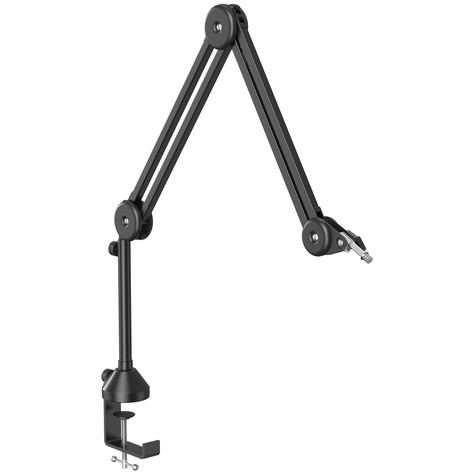
- Best Overall: TONOR T50 Boom Arm with Riser and Pop Filter (~$24–$30)
- Best Budget Scissor Arm: NEEWER MS006 Mic Arm Stand (~$18–$25)
- Best Cheap Low-Profile Arm: TONOR T20LP Low Profile Mic Arm (~$20–$30)
- Best Low-Profile Arm for Video Calls: InnoGear MU-LP35 Low Profile Mic Arm (~$25–$33)
- Best Starter Kit (Pop Filter + Windscreen): Amazon Basics 14-inch Mic Boom Arm (~$13–$20)
Comparison table
| Boom arm | Price | Style | Max load | Reach | Desk clamp (max thickness) | Threads / adapter | Extras in the box | Warranty | Best for |
|---|---|---|---|---|---|---|---|---|---|
| TONOR T50 | ~$24–$30 | Hidden-spring arm + 20 cm riser | 2 kg (4.4 lb) at 90° | 40 cm + 40 cm arms + 20 cm riser | About 2.4 in (6 cm), silicone pad | 3/8 in and 5/8 in | 180° curved pop filter, cable ties | See listing | Most USB mics; reaching over a monitor |
| NEEWER MS006 | ~$18–$25 | Scissor, exposed springs | 1.5 kg (3.3 lb) | About 27.6 in (70 cm) | 2 in (5 cm), rubber pads | 3/8 in to 5/8 in adapter | Mic clip, 5 cable ties | See listing (2 years if bought from Neewer direct) | Lowest price for a classic over-desk arm |
| TONOR T20LP | ~$20–$30 | Low-profile arm | 1.5 kg (3.3 lb) | Up to 29.1 in wide, 14 in high | 2.76 in (7 cm), silicone pads | 3/8 in + 5/8 in adapter | 4 cable ties | See listing | Low-profile look on a small budget |
| InnoGear MU-LP35 | ~$25–$33 | Low-profile arm, sits about 4.3 in high | 1.5 kg (3.3 lb) | About 25–28 in | About 2.75 in (7 cm), rubber-padded alloy C-clamp | 3/8 in to 5/8 in adapter | Shock mount (1.54–2.04 in mics), mic clip | 12 months | On-camera calls and streams |
| Amazon Basics 14-inch | ~$13–$20 | Scissor, exposed springs | Not listed (standard mics) | Two 14 in arm sections | 2 in, foam pad | 3/8 in to 5/8 in adapter | Dual-layer pop filter, foam windscreen, mic clip | See listing | First arm for a light USB mic |
Specs are from manufacturer pages and Amazon US listings as of November 18, 2026. “See listing” means we could not confirm the warranty length for the Amazon version. Prices are approximate, based on camelcamelcamel price history and recent listing prices, and change often.
1. TONOR T50: Best Overall
Key specs: two 40 cm arm sections plus a 20 cm riser post · springs hidden inside the tubes · rated for 2 kg (4.4 lb) at a 90° angle · desk clamp with a silicone pad for tops up to about 2.4 in (6 cm) thick · 3/8 in and 5/8 in mounting threads · 180° curved pop filter that fits mics up to 7.5 cm wide, including the Blue Yeti · cable ties
Price: ~$24–$30 (approx. as of Nov 18, 2026; about $30 on Amazon per camelcamelcamel, with lows near $24; prices change)
Who it’s for: Anyone with a common USB mic, such as a Blue Yeti, FIFINE K669B or HyperX QuadCast, who wants a quiet, tidy arm that can reach over a monitor or across a wide desk.
Why we picked it
- It has the highest load rating here, so a Yeti sits well inside the limit.
- The springs are inside the tubes, so it does not twang when you move it, and the 20 cm riser helps it clear a tall monitor.
- A pop filter and both thread sizes come in the box.
Watch-outs: The joints are stiff out of the box, though one hands-on review found they loosened up after adjustment. The clamp needs a flat underside. It has about 790 Amazon ratings at roughly 4.2 stars, and we could not confirm the warranty length.
2. NEEWER MS006: Best Budget Scissor Arm
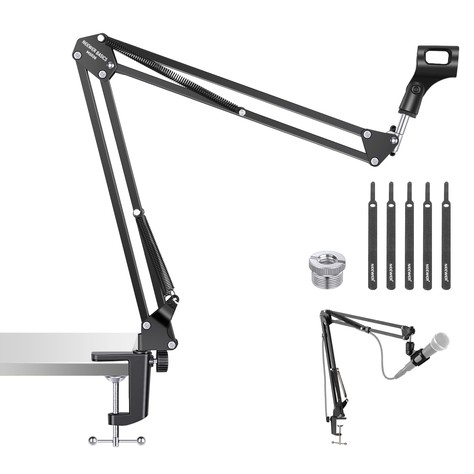
Key specs: two-section iron scissor arm with exposed springs · rated for 1.5 kg (3.3 lb) · about 27.6 in (70 cm) of reach · base rotates 360° and tilts 135°; mic clip rotates 270° · desk clamp with non-slip rubber pads for tops up to 2 in (5 cm) thick · 3/8 in to 5/8 in adapter, mic clip and five cable ties · weighs about 1.15 lb
Price: ~$18–$25 (approx. as of Nov 18, 2026; about $20 on Amazon per camelcamelcamel on Nov 9, 2026, with a recent low of $17.99; prices change)
Who it’s for: People who want the classic over-the-desk boom arm look for the least money, and who mainly need to get the mic off the desk and closer to their mouth.
Why we picked it
- It is the cheapest name-brand scissor arm we found with a 1.5 kg rating, enough for a Yeti, QuadCast or K669B.
- It folds flat when you are done, which helps on a small desk.
Watch-outs: Exposed springs creak and can ring in a sensitive mic when you move the arm mid-call. It needs firm tightening at first or a heavy mic can sag. No shock mount or pop filter, and the Blue Yeti Nano (1/4 in thread) needs an extra adapter. The 2 in clamp is the smallest here.
3. TONOR T20LP: Best Cheap Low-Profile Arm
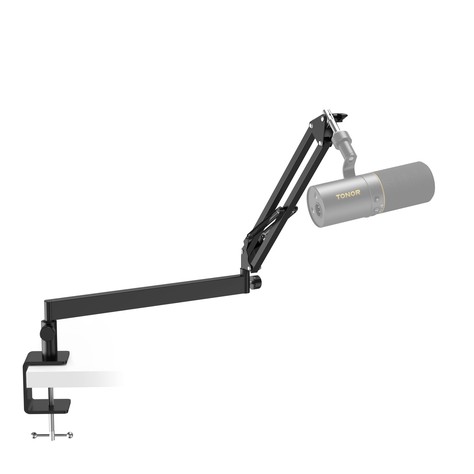
Key specs: low-profile arm that comes in from below the screen · 38 cm + 35 cm arm sections, up to 29.1 in (74 cm) wide and 14 in (35 cm) high · full-metal body with springs, rated for 1.5 kg (3.3 lb) · 360° horizontal rotation and 90° vertical adjustment · clamp contact area 2.17 × 1.97 in with silicone pads, for desks up to 2.76 in (7 cm) thick · 3/8 in thread plus a 5/8 in adapter · four cable ties
Price: ~$20–$30 (approx. as of Nov 18, 2026; about $20 on Amazon recently, down from a $29.99 list price; prices change)
Who it’s for: People who want the low-profile look that streamers use, where the mic comes in from the side at chin height and never blocks the screen, without paying $100 for an Elgato arm.
Why we picked it
- At around $20 it is the cheapest low-profile arm we found from a known mic brand.
- It stays below your monitor, so it does not block the screen or your face on a webcam.
- Its clamp opens to 2.76 in, wider than most budget arms.
Watch-outs: It cannot swing up and park above the monitor. Reviewers say cable routing takes some thought, since the cable runs along the outside. We could not confirm the warranty length.
4. InnoGear MU-LP35: Best Low-Profile Arm for Video Calls
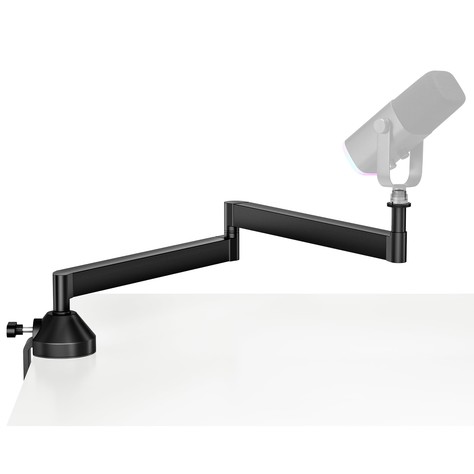
Key specs: low-profile arm that sits about 4.33 in above the desk · aluminum alloy, rated for 1.5 kg (3.3 lb) · every joint rotates 360° · alloy C-clamp with rubber pads, for tops up to about 2.75 in thick · 3/8 in to 5/8 in adapter · shock mount for mics 1.54–2.04 in across, plus a standard mic clip · 12-month InnoGear warranty (model MU-LP35)
Price: ~$25–$33 (approx. as of Nov 18, 2026; about $30 on Amazon per camelcamelcamel, with a low of $24.99 and an average near $33; prices change)
Who it’s for: Remote workers and streamers who are on camera all day and want a mic arm that tucks under the monitor and stays out of the shot.
Why we picked it
- It is the only arm here with a shock mount in the box, which cuts desk bumps and keyboard thumps that travel up the arm.
- At about 4.3 in tall it hides under almost any monitor, and the swivel joints let you aim the mic right at your mouth.
- It is an Amazon’s Choice pick with about 450 ratings at roughly 4.5 stars, the best rating of our picks.
Watch-outs: It costs the most here, and the price has swung between about $25 and $46. Like the T20LP, it cannot rise above the monitor, and 1.5 kg leaves little room for a heavy XLR mic. It needs a flat desk edge.
5. Amazon Basics 14-inch Boom Arm: Best Starter Kit
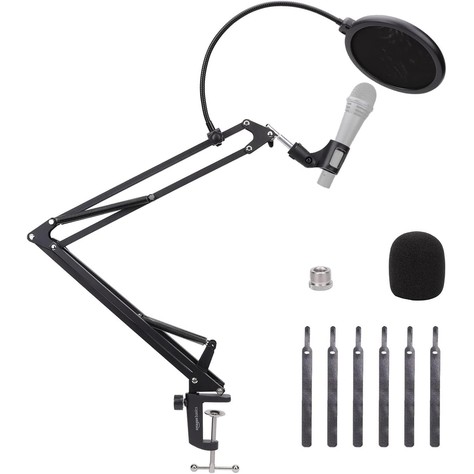
Key specs: scissor arm with two 14 in sections and adjustable tension · mostly metal, with some plastic in the quick-release and accessory fittings · desk clamp with a protective pad for tops up to 2 in thick · 3/8 in female to 5/8 in male adapter · mic clip for mics about 1.10 in across · dual-layer pop filter and foam windscreen included (model DS-BBA001)
Price: ~$13–$20 (approx. as of Nov 18, 2026; $19.99 sold by Amazon on Nov 15, 2026 per camelcamelcamel, with a low of $13.49 last November; prices change)
Who it’s for: First-time podcasters and students with a light USB mic who want an arm, a pop filter and a windscreen in one cheap box.
Why we picked it
- It is the cheapest complete kit here; its lowest price came last Black Friday.
- It is sold and shipped by Amazon, so returns are simple if it does not fit your desk.
- It has about 1,450 Amazon ratings at roughly 4.4 stars.
Watch-outs: Amazon lists no maximum load and warns that heavy mics or shock mounts may reduce performance. It gets less stable fully extended, the quick-release handle is plastic, and some owners report spring noise.
How to choose a boom arm for a USB microphone
1. Weigh your mic (without its stand)
Check the mic’s weight without its desk stand. A Blue Yeti is about 1.2 lb (550 g) alone but about 3.4 lb with its stand, which is why the stand comes off. An arm rated 1.5 kg (3.3 lb) handles almost any USB mic; a heavy XLR mic plus shock mount belongs on a 2 kg arm like the TONOR T50.
2. Over-the-desk or low-profile
A classic scissor or hidden-spring arm comes down from above, can swing up and park above your monitor, and reaches farther. A low-profile arm comes in from the side at keyboard height, stays out of your webcam shot and looks cleaner on camera, but cannot rise above the screen. If you are on camera a lot, pair a low-profile arm with good front lighting; our webcams for Zoom in low light guide covers the camera side of that setup.
3. Measure your desk edge
Every arm here uses a C-clamp. Measure the desktop and check that the edge is flat, with an inch or two of overhang and no drawer, frame or cable tray underneath. Budget clamps open to 2–2.76 in.
4. Check the thread and the mount
Mic arms usually end in a 3/8 in thread with a 5/8 in adapter, and most USB mics with a removable stand use one of those two. All five picks include the 3/8 to 5/8 in adapter. Small mics and webcams often use a 1/4 in thread, which needs another adapter.
5. Noise and cables
If you adjust your mic during calls, a hidden-spring or low-profile arm is quieter than exposed springs. Leave a little cable slack at each joint, and make sure your USB cable still reaches the computer.
FAQ
Will a boom arm fit a Blue Yeti?
Yes. Every arm here is rated for more than a Yeti weighs, and NEEWER, InnoGear and TONOR name it as compatible. Unscrew the Yeti from its desk stand with the two side knobs; the base of the mic has a threaded mount that screws onto the arm’s 5/8 in adapter. Without the stand, the Yeti is about 1.2 lb, well within every arm’s rating. Many people add a Yeti-specific shock mount later to cut desk noise. The smaller Blue Yeti Nano uses a 1/4 in thread, which NEEWER says needs a separate adapter.
Will a boom arm work with a FIFINE K669B or HyperX QuadCast?
Usually yes. NEEWER and InnoGear list both as compatible, and TONOR lists the QuadCast. The QuadCast’s shock mount screws off its stand and supports 3/8 in and 5/8 in threads. The K669B unscrews from its tripod; use the arm’s adapter if the thread does not match. Any mic from our USB microphones under $50 guide is light enough for these arms.
How thick a desk can a mic arm clamp to?
Here, the NEEWER MS006 and Amazon Basics fit desks up to 2 in thick, the TONOR T50 about 2.4 in, and the TONOR T20LP and InnoGear MU-LP35 about 2.75 in. The edge must be flat with clear space underneath. For glass or rounded edges, put a rigid plate under the clamp or clamp to a sturdy shelf.
What is the difference between 3/8 and 5/8 inch mic threads?
They are the two standard mic mount sizes. 5/8 in (5/8″-27) is common on US mic stands and many US mics, while 3/8 in (3/8″-16) is common in Europe and on many shock mounts and boom arms. A small brass adapter, usually included, converts a 3/8 in arm to 5/8 in. If the mic wobbles or will not thread, you likely need the adapter.
Does a boom arm reduce keyboard noise?
It helps. A tripod passes typing thumps straight into the mic, while an arm puts the mic closer to your mouth, so you can lower the gain and pick up less keyboard and room noise. A shock mount, like the InnoGear’s, helps more.
Quick takeaway
For most USB mics, buy the TONOR T50: 2 kg rating, hidden springs, a riser and a pop filter for about $24–$30. Get the NEEWER MS006 for the cheapest scissor arm, the TONOR T20LP for a low-profile look around $20, the InnoGear MU-LP35 if you are on camera all day, and the Amazon Basics 14-inch for the cheapest full kit.
Next reads: Best USB Microphones Under $50 (2026) if you still need the mic, and Best Webcams for Zoom in Low Light Under $50 (2026) to look as good as you sound.


Leave a Reply