Disclosure: Smart Gear Picks earns a commission from qualifying Amazon purchases made through links on this page, at no extra cost to you. Prices are approximate, based on manufacturer, review-site and price-tracker sources, and they change often. Check the current price on Amazon before buying.
Prices checked on November 16, 2026 (approximate; prices change)
Day four of the trip, your phone says storage is full, and every photo you took lives on that one phone. A cheap flash drive could take most of an evening to copy a day of 4K clips. A pocket-size portable SSD does it in minutes and gives you a second copy that rides in a different pocket.
One warning before the picks: portable SSDs got a lot more expensive this year. The Samsung T7 1TB sold for about $65 in 2023; camelcamelcamel shows it around $225–$270 on Amazon this fall, and the SanDisk 1TB Portable SSD has sat near $170–$180. Lists still showing a 1TB Samsung under $80 are out of date. Today, $80 buys a 256GB drive from a known brand or a 500GB–512GB drive from a value brand. Here are five real options that sell on Amazon US for about $45–$80, and what each is good for on the road.
Quick picks
- Best Overall for Travel: Transcend ESD310C 256GB Dual USB-C/USB-A Portable SSD (~$72–$80)
- Most Storage Under $80: Netac ZSlim 500GB Portable SSD (~$61–$89; buy it under $80)
- Fastest for Windows Laptops: Netac ZX20 512GB USB 3.2 Gen 2×2 Portable SSD (~$79–$99)
- Best for iPhone 15/16/17 Pro Video: ORICO K5Mini 256GB Magnetic Portable SSD (~$50–$60)
- Best Cheapest: SSK SD451 256GB Portable SSD (~$45–$53)
Comparison table
| Portable SSD | Price | Capacity | Max speed (read / write) | Interface / connector | Size & weight | Ruggedness | Warranty | Best for |
|---|---|---|---|---|---|---|---|---|
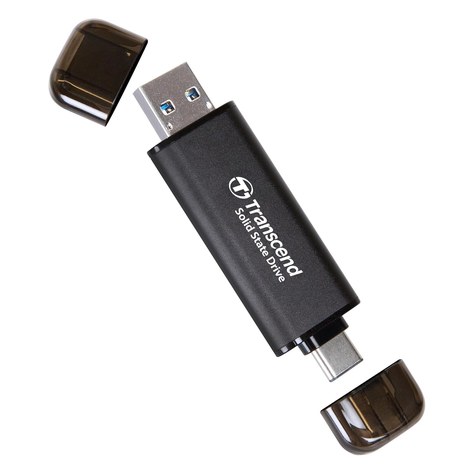
| Transcend ESD310C (TS256GESD310C) | ~$72–$80 | 256GB | 1,050 / 950 MB/s | USB 10Gbps; built-in USB-C and USB-A plugs, no cable | 2.81 × 0.79 × 0.31 in; 11 g | Capped plugs; no drop or IP rating listed | 5 years | Most travelers: phone, laptop, hotel TV |
| Netac ZSlim 500GB | ~$61–$89 | 500GB | 550 / 450 MB/s | USB 3.2 Gen 2 USB-C; C-to-A cable + adapter | 100 × 29.4 × 9 mm; ~30 g | Aluminum shell; no rating listed | 3 years | Most GB per dollar; photo backups |
| Netac ZX20 512GB | ~$79–$99 | 512GB | 2,000 / 1,700 MB/s (20Gbps port) | USB 3.2 Gen 2×2 USB-C; C-to-C and C-to-A cables | 71.5 × 43.5 × 8 mm; ~23 g | Plastic case; no rating listed | 3 years | Big video files on a Windows laptop or PC |
| ORICO K5Mini 256GB Magnetic | ~$50–$60 | 256GB | Up to 460 MB/s | USB 3.2 Gen 1 USB-C; short cable + magnetic ring | 2.4 × 3.55 × 0.42 in; ~0.13 lb | Aluminum body; no rating listed | See listing | iPhone 15 Pro and later, 4K60 ProRes |
| SSK SD451 256GB | ~$45–$53 | 256GB | 550 / 500 MB/s | USB 3.2 Gen 2; 2-in-1 USB-C/USB-A cable | About 2.7 in square; 27 g | No rating listed; LED activity light | See listing | Lowest price; a spare backup drive |
Specs are from manufacturer spec sheets and Amazon US listings as of November 16, 2026. “No rating listed” means the maker publishes no drop or IP rating. Prices are approximate, based on Keepa and camelcamelcamel price history, and change often.
1. Transcend ESD310C 256GB: Best Overall for Travel
Key specs: 256GB · up to 1,050MB/s read and 950MB/s write over USB 10Gbps (USB 3.2 Gen 2) · both a USB-C plug and a USB-A plug built into the drive, so there is no cable to lose · 71.3 × 20 × 7.8 mm and 11 g, about the size of a flash drive · preformatted exFAT for Mac, Windows, Android and iPhone/iPad with USB-C · optional password protection with Transcend Elite software · five-year limited warranty (model TS256GESD310C)
Price: ~$72–$80 (approx. as of Nov 16, 2026; about $76 on Amazon per Keepa price history; prices change)
Who it’s for: Travelers who want one tiny drive that plugs straight into a USB-C phone, a MacBook, an old USB-A hotel PC or a TV without hunting for a cable.
Why we picked it
- It is as fast as anything here on a Mac or iPhone, which run USB 3.2 drives at 10Gbps, and it never needs a cable.
- Transcend backs it with a five-year warranty, the longest of our picks, and it has about 2,400 Amazon ratings at roughly 4.6 stars.
- At 11 g it lives on a keyring or in a coin pocket.
Watch-outs: 256GB is the only size under $80; the 512GB version costs well over $100 right now. The caps are easy to lose. Transcend notes it can get warm during long transfers, and its top speed comes from an SLC cache, so very long writes can slow down. No drop or water rating.
2. Netac ZSlim 500GB: Most Storage Under $80
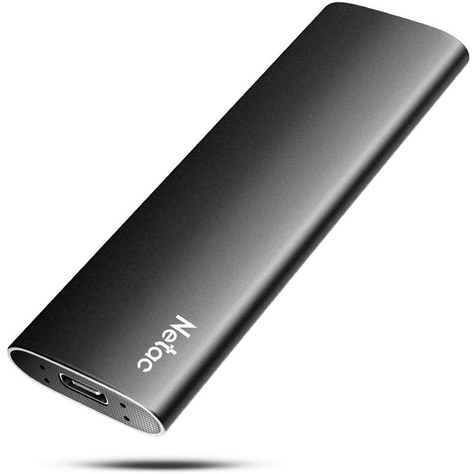
Key specs: 500GB · up to 550MB/s read and 450MB/s write over USB 3.2 Gen 2 · USB-C port with an included USB-C to USB-A cable and a USB-A to USB-C adapter · 100 × 29.4 × 9 mm, about 30 g · aluminum alloy enclosure · works with Windows, macOS, Linux and Android · 3-year limited warranty
Price: ~$61–$89 (approx. as of Nov 16, 2026; about $61 on Amazon per Keepa, down from a 30-day average near $89; prices change)
Who it’s for: Anyone who needs to back up a whole trip of photos and phone videos and cares more about room than raw speed.
Why we picked it
- It is the best-reviewed 500GB drive we found under $80 right now, with over 3,000 Amazon ratings at about 4.3 stars.
- You get about twice the storage of a 256GB name-brand drive for the same money, in a slim metal shell.
Watch-outs: The price swings a lot. It sat near $89 for most of the past month, so only buy it under $80. Some owners report drives that stopped mounting or lost data, which is common in this budget class, so keep a second copy of anything irreplaceable. For a USB-C laptop or iPhone, use the included adapter or your own 10Gbps USB-C cable.
3. Netac ZX20 512GB: Fastest for Windows Laptops
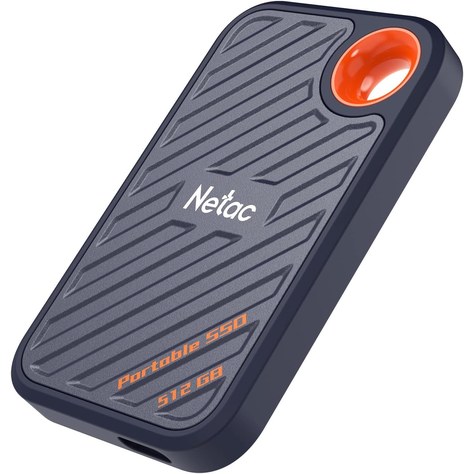
Key specs: 512GB · up to 2,000MB/s read and 1,700MB/s write on a USB 3.2 Gen 2×2 (20Gbps) port · USB-C, with both USB-C to USB-C and USB-C to USB-A cables in the box · 71.5 × 43.5 × 8 mm, about 23 g · engineering-plastic case · Windows, macOS, Linux and compatible Android · 3-year limited warranty
Price: ~$79–$99 (approx. as of Nov 16, 2026; about $79 on Amazon per Keepa, with a 30-day average near $100; prices change)
Who it’s for: Creators and gamers with a Windows laptop or desktop that has a 20Gbps USB-C port, who move big video projects or game libraries.
Why we picked it
- On a 20Gbps port it is roughly twice as fast as any other drive here and about four times faster than the budget picks.
- You still get 512GB for around $80 when it is on sale, and both cables are included, so it works on USB-A machines too.
- It has about 240 ratings at roughly 4.3 stars.
Watch-outs: Macs, iPhones and many laptops do not support USB 3.2 Gen 2×2, so there it falls back to 10Gbps, around 1,000MB/s, which is about the same as the Transcend. The 2,000MB/s figure also needs the included 20Gbps cable. The case is plastic, and the price has been closer to $100 than $80 for much of the fall.
4. ORICO K5Mini 256GB Magnetic: Best for iPhone Pro Video
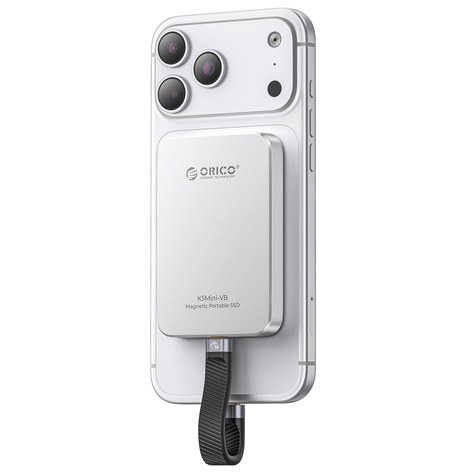
Key specs: 256GB · up to 460MB/s over USB 3.2 Gen 1 · USB-C with a short cable · built-in magnet that snaps onto a MagSafe iPhone, plus a magnetic ring for phones and tablets without MagSafe · aluminum alloy body · about 2.4 × 3.55 × 0.42 in and 0.13 lb
Price: ~$50–$60 (approx. as of Nov 16, 2026; about $60 on Amazon per Keepa, with recent lows near $50; prices change)
Who it’s for: iPhone 15 Pro, 16 Pro and 17 Pro owners who want to shoot ProRes or long 4K video on a trip without filling the phone.
Why we picked it
- It sticks to the back of your phone, so you can shoot handheld without a drive dangling off the USB-C port.
- Apple’s floor for recording 4K60 ProRes to an external drive is 220MB/s of write speed, and this drive is rated at up to 460MB/s.
Watch-outs: USB 3.2 Gen 1 tops out around 460MB/s, so it is the slowest drive here on a laptop, and it is not a safe bet for 4K120 ProRes, which Apple says needs at least 440MB/s of sustained writing. It has only about 130 ratings, at roughly 4.2 stars, and a thick case can weaken the magnet.
5. SSK SD451 256GB: Best Cheapest
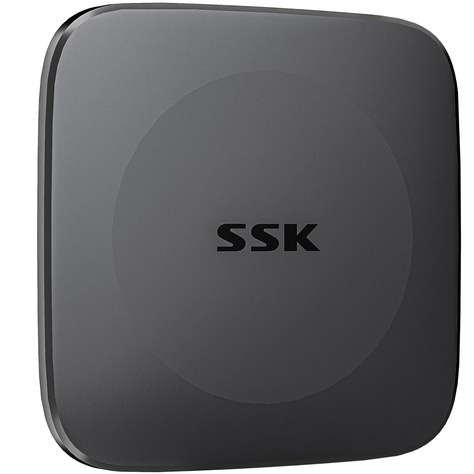
Key specs: 256GB · up to 550MB/s read and 500MB/s write over USB 3.2 Gen 2 · 2-in-1 cable with USB-C and USB-A ends · about 27 g · LED activity light, TRIM and S.M.A.R.T. health monitoring · Windows, macOS, Linux, Android, iPadOS and USB-C iPhones (model SD451)
Price: ~$45–$53 (approx. as of Nov 16, 2026; about $53 on Amazon per Keepa; prices change)
Who it’s for: Anyone who wants a second copy of their trip photos in a different bag for the least money.
Why we picked it
- It is the cheapest real SSD we would use for a backup, with about 870 ratings at roughly 4.5 stars.
- The LED shows when a copy is still running, so you do not unplug it mid-transfer.
- The 2-in-1 cable covers USB-C phones and laptops plus older USB-A hotel and office PCs.
Watch-outs: The listing does not state a warranty length. 256GB fills fast if you shoot 4K video. SSK is a value brand, so treat this as a backup drive, not your only copy. There is no drop or water rating.
How to choose a portable SSD for travel
1. Capacity: what $80 buys in 2026
Count what you shoot. A week of phone photos often fits in a few dozen gigabytes, but 4K ProRes video uses several gigabytes per minute. For photos and documents, 256GB is plenty. For lots of video, the 500GB–512GB value-brand drives give you twice the room for about the same money. A 1TB drive costs about $125 or more right now.
2. Speed: read the USB label, not just the MB/s
Portable SSD speed is capped by the port. USB 5Gbps (USB 3.2 Gen 1) tops out around 450MB/s, USB 10Gbps (Gen 2) around 1,000MB/s, and USB 20Gbps (Gen 2×2) around 2,000MB/s. A 2,000MB/s drive needs a 20Gbps port and cable to hit that number, and Macs do not support Gen 2×2, so on a MacBook a 10Gbps drive is just as fast. A cheap USB-C charging cable may run at USB 2.0 speed, about 40MB/s.
3. Connector and cable
Fewer parts is better on a trip. A drive with built-in USB-C and USB-A plugs, like the Transcend, works with a phone, a laptop and an old hotel PC with nothing else in the bag. Our cable organizers for a carry-on backpack guide has small pouches that hold a drive, a cable and a charger together.
4. Ruggedness
None of our picks under $80 carries an IP water rating, and most makers do not publish a drop rating. With no moving parts, SSDs handle bumps far better than spinning hard drives, but keep yours in a padded pouch. If you need a stated drop rating, the SanDisk 500GB Portable Drive (rated for up to 2-meter drops) usually sells for about $80–$90 and has dipped just under $80 on sale.
5. Backups and passwords
A travel drive is a second copy, not a vault. Copy your photos to it each night, keep it in a different bag from your phone, and keep a cloud copy too. If you set a password with the maker’s app, write it down, and note that iPhone ProRes recording does not work with password-encrypted drives.
FAQ
Can I take a portable SSD through airport security?
Yes. TSA allows external drives in both carry-on and checked bags, and a portable SSD has no battery, so the lithium battery rules that apply to power banks do not affect it. Airport X-ray machines do not erase or damage flash storage. Keep it in your carry-on so it stays with you if a checked bag goes missing. If you also carry a power bank, our TSA-safe power banks for international flights guide covers the watt-hour limits.
Can I record ProRes on my iPhone directly to a portable SSD?
On iPhone 15 Pro and later Pro models, yes. Apple says the drive must be formatted exFAT, must not be password-encrypted, and must connect with a USB 3 cable rated for at least 10Gbps. It must write at least 220MB/s for 4K60 ProRes and 440MB/s for 4K120 ProRes (iPhone 16 Pro and later), and draw no more than 4.5W. Here, the Transcend and the ORICO K5Mini are the easiest fits for 4K60. For 4K120, pick a 10Gbps drive like the Transcend; the ORICO’s 460MB/s rating leaves almost no headroom.
How do I format a portable SSD for both Mac and Windows?
Use exFAT. Many drives ship that way already. On a Mac, open Disk Utility, choose View > Show All Devices, select the drive (not just the volume), click Erase, and pick exFAT with GUID Partition Map. On Windows, right-click the drive in File Explorer, choose Format and pick exFAT. Formatting erases the drive.
Is a portable SSD better than a flash drive for travel?
For backups and video, usually yes. Many cheap flash drives write well under 100MB/s and slow down on big files, while the drives above are rated at roughly 450–1,700MB/s. A flash drive is fine for a few documents; for a trip of photos and 4K clips, an SSD saves real time.
Quick takeaway
For most travelers, the Transcend ESD310C 256GB is the one to buy: it plugs straight into USB-C or USB-A, weighs 11 g, runs at 10Gbps and has a five-year warranty. Get the Netac ZSlim 500GB if you need more room and can catch it under $80, the Netac ZX20 if you have a 20Gbps Windows laptop and big video files, the ORICO K5Mini if you shoot on an iPhone Pro, and the SSK SD451 if you just want a cheap second backup.
Next reads: Best TSA-Safe Power Banks for International Flights (2026) for a long travel day, and Best Cable Organizers for a Carry-On Backpack (2026) to keep the drive and cables together.


Leave a Reply