Disclosure: Smart Gear Picks earns a commission from qualifying Amazon purchases made through links on this page, at no extra cost to you. Prices are approximate, based on Amazon listing, manufacturer and price-tracker sources, and they change often. Check the current price on Amazon before buying.
Prices checked on November 11, 2026 (approximate; prices change)
You turned on a Zoom virtual background to hide the laundry pile, and now your ears keep vanishing. Lean back and your headphones melt into the beach. Without a green screen, Zoom has to guess where you end and the room begins, and in a busy room with mixed lighting it guesses badly. A plain, evenly lit green surface behind you gives the software one simple color to remove, so your outline stays clean.
A green screen for video calls does not need to be a $150 pull-up panel. This guide compares five real green screens that typically sell for about $15–$40 on Amazon US: a full-size kit with a stand, a chair-mounted circle for tiny rooms, a cheap sheet you can hang on a door or curtain rod, an extra-wide kit for wide-angle webcams, and a reversible blue and green kit for people who wear green. If your bigger problem is a grainy, dark image, start with our webcams for Zoom in low light guide first, because a green screen works best when the camera can see you clearly.
Quick picks
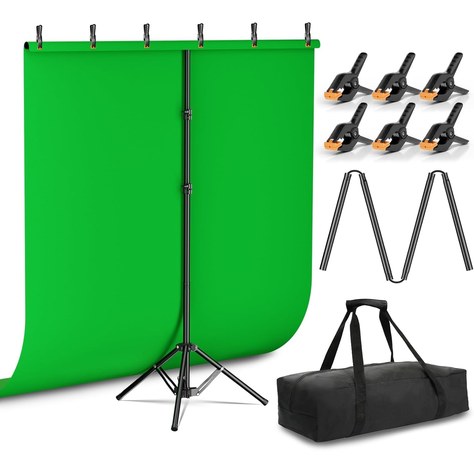
- Best Overall: EMART 5×6.5 ft Green Screen Kit with T-Stand (~$28–$33)
- Best for Small Rooms (Chair-Mounted): CoosBonfik 56-inch Collapsible Chair Green Screen (~$28–$35)
- Best Cheapest: EMART 5×7 ft Green Screen Backdrop Sheet (~$14–$17, no stand)
- Best for Wide-Angle Webcams: Hemmotop 8×7.5 ft Wider Green Screen Kit (~$37–$41)
- Best if You Wear Green (Reversible Blue/Green): EMART 2-in-1 Blue and Green Backdrop Kit (~$34–$38)
Comparison table
| Green screen | Price | Mount / setup | Key specs | Warranty | Best for |
|---|---|---|---|---|---|
| EMART Green Screen Kit with T-Stand | ~$28–$33 | Freestanding T-stand · clamps | 5 × 6.5 ft polyester · stand 4–6.5 ft tall (2.7–5.1 ft without top pole) · 5 ft crossbar · 6 clamps · bag · ~6.2 lb | EMART support (see listing) | Most home offices; seated or standing |
| CoosBonfik 56″ Chair Green Screen | ~$28–$35 | Straps to chair back · pops open | 56 in round · spring-steel ring · thick polyester · ~1 lb · folds into bag | Seller support (see listing) | Small rooms, shared spaces, no floor space |
| EMART 5×7 ft Backdrop Sheet | ~$14–$17 | Hang on rod, wall, door or stand you own | 5 × 7 ft polyester · rod pocket on 5 ft edge · 2 clamps · machine washable · ~13 oz | EMART support (see listing) | Lowest cost; you already have somewhere to hang it |
| Hemmotop Wider Green Screen Kit | ~$37–$41 | Freestanding T-stand · clamps | 8.2 × 6.5 ft seamless polyester · stand 3.1–8 ft tall, up to 7.5 ft wide · bag · ~5 lb | 1 year (Hemmotop) | Wide-angle webcams, standing desks, two people |
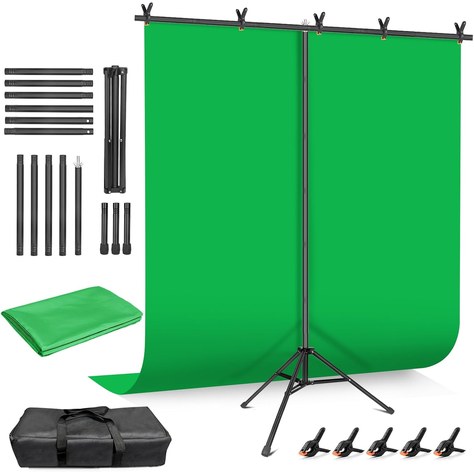
| EMART 2-in-1 Blue/Green Kit | ~$34–$38 | Freestanding T-stand · clamps | 5 × 7 ft reversible blue/green polyester · stand 4–6.5 ft (2.7–5 ft without top pole) · 5 clamps · bag | 2 years (per listing) | People who wear green, or want a blue option |
Specs are from Amazon listing details and manufacturer pages. Warranty terms are as listed on Amazon US; where a listing names no warranty, contact the seller. Prices are approximate and change often. Webaround (~$48) and Elgato pull-up panels are over budget, so they are not ranked.
1. EMART 5×6.5 ft Green Screen Kit with T-Stand: Best Overall
Key specs: Freestanding T-shape stand with a reverse-folding tripod base · height 4–6.5 ft (121–200 cm), or 2.7–5.1 ft with the telescopic pole removed for a lower, seated setup · 5 ft (1.5 m) four-section crossbar joined by an internal cord · green polyester backdrop sized about 5 × 6.5–7 ft (the listing uses both) · 6 spring clamps · carry bag · about 6.2 lb total
Price: ~$28–$33 (approx. as of Nov 11, 2026; about $32.99 on Amazon with frequent dips to the high $20s; prices change)
Who it’s for: You work from home a few days a week, you have about 5 feet of wall behind your chair, and you want a proper flat green surface on a stand.
Why we picked it
- It is the simplest complete kit under $40: fabric, stand, crossbar, clamps and a bag in one box, so you are not hunting for a curtain rod.
- It has a strong review base, around 1,800+ ratings at about 4.3 stars, and EMART lists Zoom meetings and streaming as core uses.
Watch-outs: The fabric arrives folded, so expect creases. Steam it or iron it on low heat before your first call, because every crease throws a shadow that Zoom can mistake for you. A 5 ft wide screen needs to sit fairly close behind your chair (about 2–4 ft) to fill the frame of a typical laptop webcam. The tripod legs take up floor space behind you, and a T-stand can tip if someone bumps it, so keep it out of walkways.
2. CoosBonfik 56-inch Chair Green Screen: Best for Small Rooms
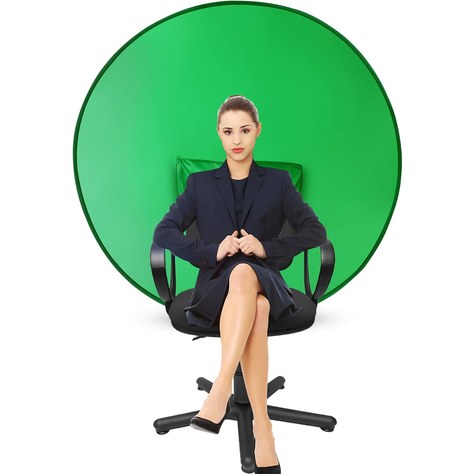
Key specs: 56 in (142 cm) round pop-up green screen · high-strength spring-steel outer ring keeps the fabric taut · thick, non-reflective polyester that can be washed or ironed · elastic sleeves slip over the back of most office and gaming chairs · about 16 oz · twists down into a small storage bag
Price: ~$28–$35 (approx. as of Nov 11, 2026; listed at $34.99 on Amazon with other offers in the high $20s; prices change)
Who it’s for: You take calls from a bedroom, a closet office or a shared space where a stand would block a door, and you only ever need the head-and-shoulders view.
Why we picked it
- It moves with you. It stays right behind your head even if you roll back.
- Setup takes seconds: pop it open, slide it over the chair back, done.
Watch-outs: Ratings are middling (about 3.8 stars from 300+ reviews), the lowest of our five picks, so read recent reviews and keep the return window in mind. Practice the twist-fold before you need to pack it. Coverage is limited: a wide-angle webcam or a camera set far from you will see the room around the circle. Because the screen sits right behind your shoulders, green light can bounce onto your hair and the edges of your shirt, so light your face well.
3. EMART 5×7 ft Green Screen Backdrop Sheet: Best Cheapest
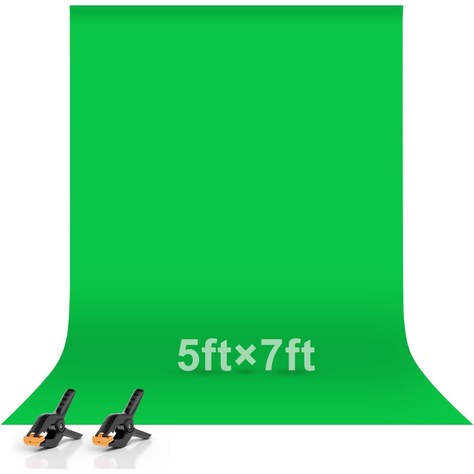
Key specs: 5 × 7 ft green polyester backdrop (model EM-1520P) · non-reflective surface · rod pocket sewn on the 5 ft edge · 2 spring clamps included · locked edges to prevent fraying · machine washable · about 13 oz · no stand included
Price: ~$14–$17 (approx. as of Nov 11, 2026; about $16.49 on Amazon, sometimes lower; prices change)
Who it’s for: You want to try a green screen for the price of lunch, and you already have something to hang it from: a curtain or tension rod, a bookcase top, a door, or command hooks on the wall behind your desk.
Why we picked it
- It is by far the most-reviewed option here, with 14,000+ ratings around 4.5 stars, so you know what you are getting.
- For a seated Zoom call, a flat sheet pulled tight on a wall usually keys better than a loose fabric on a stand, because a wall cannot sway.
Watch-outs: There is no stand in the box, so this only works if you have a way to hang it, and two clamps are not many. Add binder clips to pull the corners tight. Like every fabric screen, it creases in the package and needs steaming. Hang it against a wall rather than in front of a bright window, since strong backlight can show through thin fabric and make the green uneven.
4. Hemmotop 8×7.5 ft Wider Green Screen Kit: Best for Wide-Angle Webcams
Key specs: Seamless one-piece 8.2 × 6.5 ft polyester screen, non-reflective front · T-stand with 5 rod sections for heights from 3.1 to 8 ft and 3 width settings up to 7.5 ft · laser-cut edges to resist fraying · clamps with removable, rotatable pads · carry bag · about 5 lb · 1-year Hemmotop warranty (model 2224TGR)
Price: ~$37–$41 (approx. as of Nov 11, 2026; about $39.98 on Amazon, tracked between roughly $37 and $44 in recent months; prices change)
Who it’s for: Your webcam has a wide field of view (many 1080p and 4K models are 90 degrees or more), you use a standing desk, or two people sometimes share the call.
Why we picked it
- It is the widest kit we found under about $40, at up to 7.5 ft of stand width. Wide webcams are the number one reason a 5 ft screen “is not big enough.”
- The stand goes as low as 3.1 ft, so it can sit just above a seated head instead of looming over the room.
- It has about 1,800+ ratings around 4.3 stars, and the one-piece screen means no center seam for Zoom to trip over.
Watch-outs: It is right at the top of the budget, and some days it crosses $40. Bigger fabric means bigger creases, and the polyester ripples unless you clamp it evenly along the bar. The stand footprint is large, and light T-stands can tip, so weight the legs if you have pets or kids.
5. EMART 2-in-1 Blue and Green Backdrop Kit: Best if You Wear Green
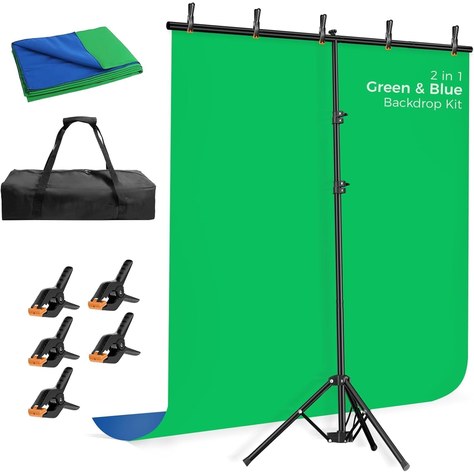
Key specs: Reversible 5 × 7 ft polyester backdrop, chroma blue on one side and chroma green on the other · T-shape stand with reverse-folding base, 4–6.5 ft tall or 2.7–5 ft with the top pole removed · 5 ft crossbar · 5 clamps · carry bag · finished edges, machine washable · 2-year warranty per the listing
Price: ~$34–$38 (approx. as of Nov 11, 2026; about $37.99 on Amazon, with other offers near $34; prices change)
Who it’s for: You own a lot of green shirts, you have a green plant or green-tinted glasses that keep disappearing, or you want to try both colors to see which keys better in your room.
Why we picked it
- Flip the fabric and you have a blue screen, so your green sweater or company polo does not turn invisible on camera.
- It is the best-rated pick here at about 4.4 stars from 2,300+ ratings, with the same reverse-folding stand as our top pick.
Watch-outs: Zoom’s “I have a green screen” option can pick the key color, but some apps and webcam tools are tuned for green first, so test blue before an important call. The fabric still needs steaming, and the kit is heavier (about 6.6 lb) than the sheet or chair options.
How to choose a green screen for Zoom calls
1. How much does your webcam actually see?
Open Zoom, turn on your camera and look at the edges of the preview. Whatever is visible behind you is the area the green screen has to cover, with a few inches to spare. A typical laptop webcam at a desk sees roughly 4–5 ft of wall when you sit 2–3 ft in front of it, so a 5 ft wide screen is enough. Wide-angle external webcams can see 7 ft or more, which is when the Hemmotop makes sense.
2. Stand, wall or chair?
A stand kit is the most flexible and works sitting or standing, but it needs floor space behind you. A sheet hung on a wall or rod is the cheapest and the flattest. A chair-mounted circle needs no space at all but only covers your head and shoulders.
3. Plan for wrinkles
Every fabric green screen arrives creased, and creases make shadows that Zoom treats as “not background.” Hang it, then steam it or iron it on low heat, and clamp it tight at the corners.
4. Light the screen and yourself separately
The single biggest upgrade after buying a green screen is light. You want the green evenly lit with no hot spots, and your face lit from the front so you stand out from it. A cheap ring light under $40 in front of you helps a lot.
5. Watch what you wear
Anything close to the screen color disappears. Skip green shirts, green-tinted glasses lenses and very shiny jewelry with a green screen, or go with the reversible blue and green kit.
FAQ
Do you need a green screen for a Zoom virtual background?
No, Zoom can blur or replace your background without one, but the result is usually rougher. Without a green screen, Zoom uses AI to guess your outline, so ears, hands, headphones and hair often flicker or vanish. With a green screen, you check “I have a green screen” in Zoom’s background settings and it removes one solid color instead, which gives a cleaner, steadier edge.
How do I turn on the green screen setting in Zoom?
In the Zoom desktop app, open Settings, then Background & Effects (or Backgrounds & Filters in some versions), choose a virtual background, and check “I have a green screen.” If parts of the screen still show, click the color swatch and pick the green from your preview.
What size green screen do I need for video calls?
For a seated call with a laptop or a standard webcam, about 5 ft wide is enough if the screen sits 2–4 ft behind your chair. A 56-inch chair-mounted circle covers a tight head-and-shoulders shot. If you use a wide-angle webcam, a standing desk, or share calls with a second person, go wider, around 7–8 ft.
Why does my green screen look patchy or flicker in Zoom?
It is almost always lighting or wrinkles. Uneven light creates darker and brighter greens, so Zoom only removes some of it. Steam out creases, light the screen evenly from the front or side, avoid a bright window behind it, and sit a little farther in front of it to cut down on green spill on your shoulders.
Quick takeaway
For most people, the EMART Green Screen Kit with T-Stand is the easiest complete setup under $40. Choose the CoosBonfik chair screen if you have no floor space, the EMART 5×7 sheet if you can hang it yourself and want to spend under $20, the Hemmotop wider kit for wide-angle webcams or a standing desk, and the EMART blue/green kit if you wear green. Whatever you pick, steam out the wrinkles and light your face, and Zoom’s background will stop eating your ears.
Next reads: Best Webcams for Zoom in Low Light Under $50 (2026) so the camera can actually see you clearly, and Best Ring Lights Under $40 (2026) to light your face evenly in front of the screen.


Leave a Reply