Disclosure: Smart Gear Picks earns a commission from qualifying Amazon purchases made through links on this page, at no extra cost to you. Prices are approximate, based on manufacturer, review and price-tracker sources, and they change often. Check the current price on Amazon before buying.
Prices checked on October 30, 2026 (approximate; prices change)
Picture the classic spare-room home office: one small window, and a ceiling light right behind the chair. Every 8 a.m. call in November looks the same. There’s a bright halo around your head, your face is dark, and the picture turns into a grainy, orange smear whenever you move. A “better” 1080p webcam barely helps. The real fix is two things: a camera that actually handles dim light, and about $0 to $20 of smarter lighting.
This guide is for that exact room. We compared five webcams under $50 on the features that matter when the light is bad: sensor size, HDR and auto-exposure, built-in ring lights, autofocus that doesn’t hunt in the dark, and frame rate. If you just want a good general-purpose camera, our Best USB Webcams Under $50 covers that. This one is about looking human on Zoom at 7 a.m. in December.
Quick picks
- Best Overall for Dim Rooms: Acer A640 4K (Sony 1/2.8″ sensor) (~$40–$45)
- Best Ring Light + HDR for Zoom: Angetube 967Pro (~$40–$50)
- Best 4K + Ring Light: Angetube 967Ultra (~$40–$50)
- Best Budget Auto Light Correction: Logitech Brio 101 (~$25–$40)
- Best HDR for Backlit Rooms (Watch the Price): Dell WB3023 2K QHD (~$44–$60)
Comparison table
| Webcam | Price | Resolution / fps | Low-light feature | FOV | Mic | Mount | Warranty | Best for |
|---|---|---|---|---|---|---|---|---|
| Acer A640 | ~$40–$45 | 4K/30, 1080p/60 | Sony 1/2.8″ sensor, PDAF, auto low-light correction | ~77° | AI noise-canceling | Clip + tripod thread, USB-A (C adapter) | 1 year (US) | Dim rooms with some lamp light |
| Angetube 967Pro | ~$40–$50 | 1080p/60, HDR 1080p/30 | 3-level ring light, HDR mode, f/2.0, auto light correction | 76° | Dual stereo mics | Clip, USB-A (C adapter) | 1 year | Dark rooms, Zoom and Teams calls |
| Angetube 967Ultra | ~$40–$50 | 4K/30, 1080p/60 | 3-level ring light, 1/2.8″ sensor, PDAF | 78° | Dual noise-canceling | Clip + tripod thread, USB-A/C | 1 year | Dark rooms, streaming at 60fps |
| Logitech Brio 101 | ~$25–$40 | 1080p/30 | RightLight 2 auto light balance | ~58° | Mono | Clip, USB-A | 2 years | Tight budgets, moderately dim rooms |
| Dell WB3023 | ~$44–$60 | 1440p/30, 720p/60 | HDR, f/2.0, face-based auto exposure, 3D noise reduction | 65° / 78° | Noise-reduction | Clip + tripod thread, USB-A | 3 years (Advanced Exchange) | Window or lamp behind you |
FOV is the maker’s listed field of view. Warranties are US manufacturer terms.
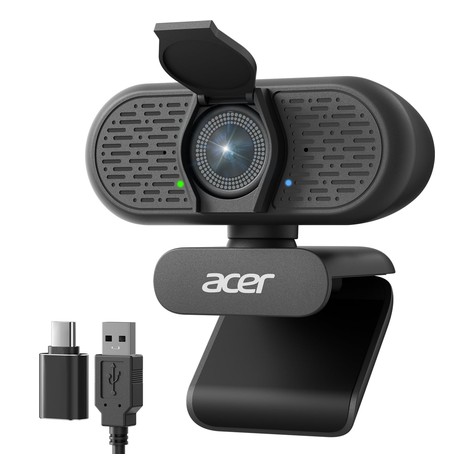
1. Acer A640 4K Webcam: Best Overall for Dim Rooms
Key specs: 4K/30fps, 2K and 1080p/60fps · Sony 1/2.8-inch sensor · PDAF autofocus · auto low-light correction · AI noise-canceling mic · privacy shutter · USB-A with USB-C adapter
Price: ~$40–$45 (approx. as of Oct 30, 2026; prices change)
Who it’s for: You work in a room that’s dim but not dark, lit by a desk lamp or a monitor glow, and you want the cleanest picture $40 buys without a light stuck to the camera.
Why we picked it
- A 1/2.8-inch Sony sensor is bigger than what most sub-$50 webcams use (many don’t list a size at all). A bigger sensor collects more light, which means less grain and less smearing before any software kicks in.
- PDAF (phase-detection) autofocus locks on fast. Cheaper contrast autofocus tends to hunt back and forth in low light, which is the “breathing” blur you see on many cheap webcams at night.
- 1080p at 60fps gives the camera more room to work. In dim light many webcams drop to 15fps and look choppy. Starting at 60 means you still get a smooth 30 when it has to slow down.
Watch-outs: It has no built-in light. Reviewers say it still goes dark and loses detail in a truly unlit room, so pair it with a lamp (see the lighting tips below). It’s a newer listing with fewer reviews than the Logitech, and Acer’s US accessory warranty is one year.
2. Angetube 967Pro: Best Ring Light + HDR for Zoom
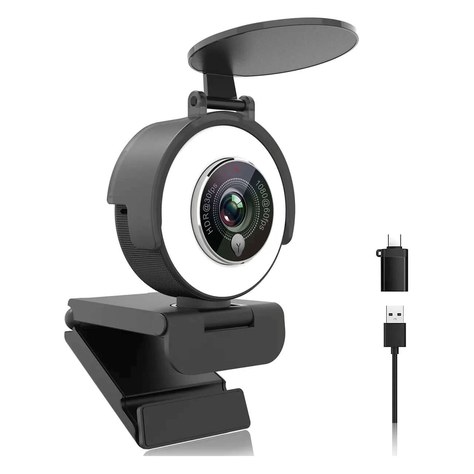
Key specs: 1080p/60fps or HDR 1080p/30fps · 1/2.9-inch 2MP sensor · f/2.0 lens · 3-level ring light with touch control · autofocus (can be switched off) · 76° FOV · 5x digital zoom · dual stereo mics · privacy cover · USB-A with USB-C adapter
Price: ~$40–$50 (approx. as of Oct 30, 2026; prices change)
Who it’s for: Your desk has no good lamp, you take Zoom or Teams calls early or late, and you want one plug-in fix with no extra stand or cable.
Why we picked it
- The ring light adds real light right where the camera needs it. It has three brightness levels, set with a touch button.
- It’s the only ring-light pick with an HDR mode. Switch to HDR at 1080p/30 when a window or lamp is behind you, or use 1080p/60 when you want smoother motion.
- Its f/2.0 lens gathers more light than most budget webcams, and you can lock autofocus so it doesn’t hunt in the dark.
Watch-outs: Its 1/2.9-inch sensor is smaller than the Acer’s or the 967Ultra’s, so with the ring light off it looks softer and grainier in a dim room. Reviewers say the light works best at close range and won’t replace a real key light, the 5x zoom is digital and gets soft fast, and the small USB-C adapter feels flimsy. If you wear glasses, use the lowest light level. Warranty is one year.
3. Angetube 967Ultra: Best 4K + Ring Light
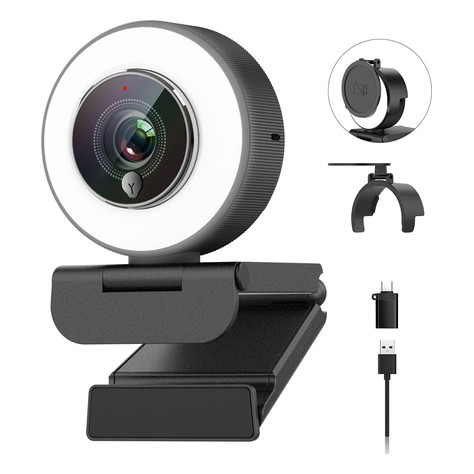
Key specs: 4K/30fps, 1080p/60fps · 1/2.8-inch CMOS sensor · 3-level ring light · PDAF autofocus · 78° FOV · dual noise-canceling mics · privacy cover · USB-A and USB-C
Price: ~$40–$50 (approx. as of Oct 30, 2026; prices change)
Who it’s for: You want a ring light and a sharper sensor in one camera, or you stream in the evening and need 60fps.
Why we picked it
- It combines both low-light fixes in one camera: its own ring light plus a 1/2.8-inch sensor with PDAF autofocus. Its cheaper sibling, the 967Pro, and most other ring-light webcams at this price stop at 1080p with a smaller sensor.
- 1080p at 60fps keeps motion smooth on Twitch or OBS, and 4K/30 gives you room to crop for recordings.
Watch-outs: The current Amazon listing is fairly new, so there are fewer long-term owner reviews than for the 967Pro, which has been sold since at least 2023. Treat it as a strong spec sheet with a shorter track record. Like any ring light near the lens, it can reflect in glasses. The warranty is one year through Angetube support.
4. Logitech Brio 101: Best Budget Auto Light Correction
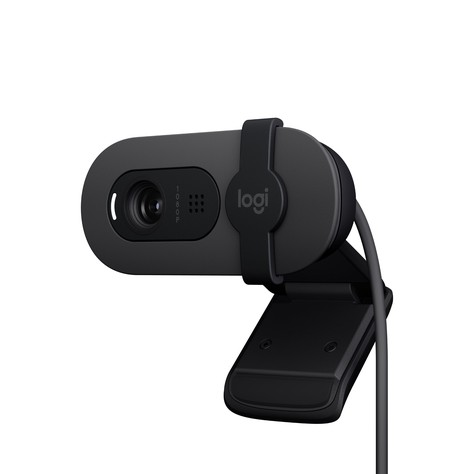
Key specs: 1080p/30fps · RightLight 2 auto light balance · fixed focus · ~58° FOV · mono mic · integrated privacy shutter · USB-A
Price: ~$25–$40 (approx. as of Oct 30, 2026; prices change)
Who it’s for: Your room is a bit dim, not dark, and you want a trusted brand for as little as possible. It’s also a smart pick if you plan to spend the savings on a lamp.
Why we picked it
- Logitech’s RightLight auto light balance brightens faces in uneven light. Logitech says its Brio 100-series RightLight makes your face up to 50% brighter than its older C270.
- It’s the one pick that overlaps with our general webcams guide, on purpose: it’s the cheapest name-brand camera with real auto light correction, and the narrow view hides a messy room.
Watch-outs: Its 1080p sensor is small and it has fixed focus, so it can’t save a nearly dark room. Software correction just turns up the grain. It has USB-A only, so MacBook owners need an adapter or hub. The price moves a lot, from about $23 on sale up to $40.
5. Dell WB3023 2K QHD: Best HDR for Backlit Rooms (Watch the Price)
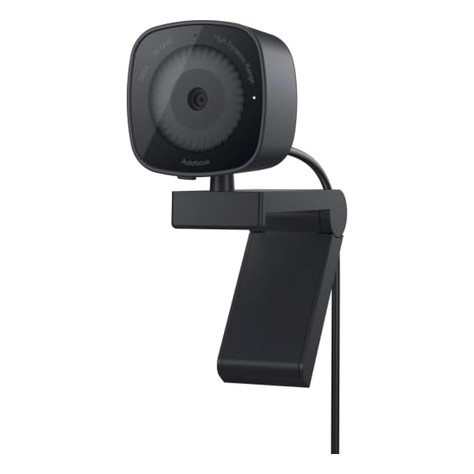
Key specs: 2560 × 1440 (2K QHD) · Sony sensor · f/2.0 lens · HDR · Facial Detection Auto Exposure · 2D/3D noise reduction · autofocus · 65°/78° FOV · noise-reduction mic · sliding privacy shutter · USB-A, 4.9 ft cable
Price: ~$44–$60 (approx. as of Oct 30, 2026; prices change)
Who it’s for: Your problem isn’t just darkness. It’s a window or a lamp behind you that turns your face into a silhouette.
Why we picked it
- It has the most complete backlight setup here. HDR plus face-detection exposure keeps your face bright without blowing out the window behind you, which is the number-one “I look like a witness-protection interview” problem.
- The f/2.0 lens and 3D noise reduction mean less grain and motion smear when the light drops.
- Dell includes a 3-year Advanced Exchange warranty, the longest here by far. If it fails, Dell ships a replacement the next business day after remote diagnosis.
Watch-outs: Dell sells it for about $66 and Amazon’s own price is often near $60. Under $50 usually means a third-party seller or a sale, so only buy it at $50 or less to stay in budget. It has no ring light, and its Mac support lists macOS 11–13, so check your version.
Sponsored Pick: OIEXEN 2K Webcam (Sony 1/2.8″ Sensor)
Ad / Sponsored — Smart Gear Picks earns a bonus commission from this brand partnership (Amazon Creator Connections). It is listed separately from our ranked picks.
A Creator Connections partnership pick: a 2K USB webcam built around a Sony 1/2.8″ sensor, a larger sensor class that usually helps in dim home offices. Plug-and-play USB for Zoom, Teams and Meet. Check the current price and the low-light sample shots on the listing.
How we picked
We started with webcams under $50 that list a specific low-light feature: a stated sensor size, HDR, a built-in light, or named auto light correction. We cut anything that only says “low light” in the title with no spec behind it. Next we checked frame rate and focus type, because dim light is where cheap autofocus hunts and frame rates collapse. Finally we checked price history so each pick is regularly under $50, not just on one flash sale.
We weighed independent reviews more heavily than listing claims, and we say so in the picks whenever reviewers found a camera still goes dark in a truly unlit room. We left out two well-reviewed low-light cameras, the Anker PowerConf C200 (Tom’s Guide and Laptop Mag both praised its after-dark video) and the EMEET S600 (Sony 1/2.55″ sensor), because they sell for about $57–$70 right now. If either drops under $50, it’s worth a look.
How to choose a webcam for low light
1. Sensor size beats resolution
A bigger sensor gathers more light per pixel, and that’s the physical fix for grain. Look for a listed size like 1/2.8″ or 1/2.7″. (Smaller second number = bigger sensor: 1/2.5″ beats 1/2.8″.) A 4K camera on a tiny sensor can look worse at night than a 1080p camera on a bigger one, and Zoom usually sends 720p or 1080p anyway.
2. HDR and auto-exposure for backlight
If a window or lamp is behind you, you need HDR or face-based auto-exposure (Dell calls it FDAE). Without it, the camera exposes for the bright background and your face goes dark. Better still, turn your desk so the window is in front of you or off to one side.
3. Built-in ring light vs. software correction
Auto light correction (Logitech RightLight, “low-light correction” on most listings) just turns up brightness and gain, so it adds grain as it goes. A built-in ring light adds real light. If your room is truly dark in the morning or evening, a ring-light webcam or a separate light will help more than any sensor upgrade under $50.
4. Frame rate and autofocus
In dim light, webcams slow the shutter to gather light, and frame rates fall. A camera rated for 1080p/60 has more headroom. PDAF autofocus locks on faster and hunts less than contrast autofocus.
5. Cheap lighting fixes that beat a new camera
- Light your face, not the room. Put a lamp behind your monitor, aimed at the wall, so the light bounces back softly. Or clip a small light at eye level.
- Use a monitor light bar or desk lamp at 4000–5000K. It matches daylight and the camera’s white balance. See our monitor light bars under $40.
- Add a small ring light. A $20–$40 desk or clip-on ring light fixes most dark-room calls with any webcam. See our ring lights under $40.
- Turn on Zoom’s low-light setting. In Zoom, go to Settings → Video and turn on “Adjust for low light” (Auto or Manual). Teams and Meet have similar brightness options.
6. Mic, mount and ports
All five clip onto a monitor or laptop, and the Acer, 967Ultra and Dell also have a tripod thread. On a USB-C-only Mac, the Acer and both Angetubes include an adapter. Webcam mics pick up the room. For a clearer voice, a headset or one of our USB microphones under $50 is the bigger upgrade.
FAQs
How do I look better on Zoom in a dark room?
Add light in front of you first, then fix the camera. A lamp behind your monitor or a small ring light, plus turning on Zoom’s “Adjust for low light” under Settings → Video, fixes most dark calls. A webcam with a larger sensor or a built-in ring light handles the rest.
Does a 4K webcam help in low light?
Not by itself. Low-light quality depends mostly on sensor size, lens aperture and processing. A 4K camera on a small sensor can look grainier at night than a 1080p camera with a bigger one. Zoom also usually sends 720p or 1080p video.
Why is my webcam grainy in low light?
Without enough light, the camera turns up its gain (digital amplification), which also amplifies noise. It may also slow the shutter, which causes motion blur. More light on your face is the cure. Locking exposure in the webcam’s app can also stop the image from pumping.
Is a webcam with a built-in ring light better than a separate ring light?
A built-in light is simpler: one cable, no stand, and it’s always aimed at you. A separate ring light or light bar is bigger and softer, so it flatters more and causes less glare in glasses. If you wear glasses or want the best look, a separate light plus a good webcam usually wins.
Quick takeaway
For most dim home offices the Acer A640 is the best camera under $50. Its bigger Sony sensor and PDAF autofocus beat the usual budget webcam once the lights go down. If your room is truly dark, get a camera that brings its own light: the Angetube 967Pro for meetings (with HDR for backlit rooms) or the Angetube 967Ultra for 4K and a bigger sensor. On a tight budget, the Logitech Brio 101 plus a $20 lamp beats a pricier camera alone. If a window behind you is the problem, the Dell WB3023‘s HDR is worth catching on sale.
Related: Best USB Webcams Under $50 (2026) (everyday picks, post 159) · Best Ring Lights Under $40 (2026) (the cheapest low-light fix, post 217)


Leave a Reply