Disclosure: This post contains affiliate links. If you buy through a link, Smart Gear Picks may earn a commission at no extra cost to you.
Prices checked on October 16, 2026.
You’re at a cafe table with a MacBook Air, a second USB-C port already eaten by the charger, and a presenter asking for HDMI. The mouse dongle, the SD card from the camera, and the Ethernet cable for hotel Wi-Fi all need a home — and the Air only has two Thunderbolt / USB-C ports. A USB-C hub under $50 is the MacBook Air fix: HDMI for one external display, PD pass-through so you can charge while you work, USB-A for accessories, and (on the right models) SD or Ethernet without a bag of dongles. I compared current Amazon US multiport hubs that fit M-series MacBook Air workflows under $50, weighing PD wattage, HDMI refresh (4K@60Hz vs 30Hz), port mix, Mac-focused review notes, and price. Some honest guidance first. Base M1, M2, and M3 MacBook Air chips natively drive one external display. A normal USB-C hub will not magically add a second independent monitor; that needs DisplayLink (or a higher-chip Mac). PD pass-through needs a real USB-C Power Delivery wall charger. The hub siphons about 15W for itself, so a 65W or 100W GaN brick is the realistic MacBook Air pairing. 4K@60Hz HDMI feels smoother than 4K@30Hz for scrolling and video calls, and every pick here claims 4K@60Hz on a DP Alt Mode host. Thunderbolt docks and USB-C hubs are not the same. These are USB-C / DP Alt Mode hubs, not $200+ Thunderbolt docks — plenty for Air desk and travel, not a 18-port CalDigit. Prefer Ships from Amazon, clear PD + HDMI claims, and strong review volume over mystery no-names. These five cover an all-rounder with Ethernet and SD, a cheap 7-in-1 with SD, a feature-packed Ethernet hub, a compact Ethernet+SD stick, and a high-PD premium hub under the $50 cap.
Quick comparison
| Product | Price (research) | Key specs | Warranty | Best for |
|---|---|---|---|---|
| Anker 555 8-in-1 | $35.99 | 4K@60 HDMI, 85W PD, 10Gbps USB-C/A, Gigabit Ethernet, SD/microSD | 18 months | Best Overall |
| Anker 7-in-1 (A83D2) | $19.99 | 4K@60 HDMI, 85W PD, 5Gbps USB-C/A, SD/TF (no Ethernet) | 18 months | Best Budget |
| UGREEN Revodok Pro 9-in-1 | $29.99 | 4K@60 HDMI, 85W PD, 10Gbps data, Gigabit Ethernet, SD/TF, HDMI off button | 24 months | Best with Ethernet |
| UGREEN Revodok 7-in-1 | $29.99 | 4K@60 HDMI, 85W PD, 5Gbps USB-A, Gigabit Ethernet, SD/TF | 24 months | Best Compact Multiport |
| Plugable USBC-9IN1E | $49.95 | 4K@60 HDMI, up to 140W PD in / 125W out, 10Gbps, Gigabit Ethernet, UHS-II SD/microSD | 2 years + lifetime support | Best High PD |
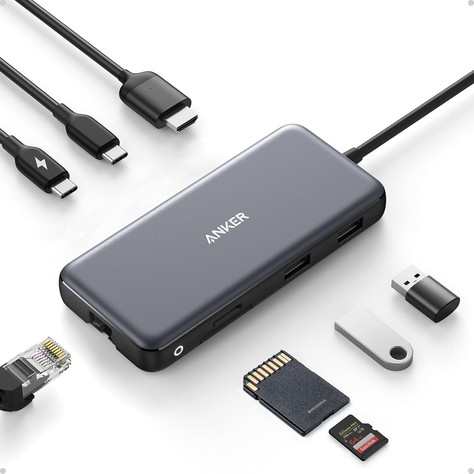
1. Anker 555 USB-C Hub (8-in-1) — Best Overall
Who it’s for: MacBook Air owners who want one hub for HDMI, PD charging, USB-A accessories, Gigabit Ethernet, and SD/microSD without jumping to a full Thunderbolt dock.
Why it made the list: It’s the best all-in-one mix under $50 for an Air desk or bag: 4K@60Hz HDMI (on DP 1.4 hosts; 4K@30Hz on DP 1.2), up to 85W PD pass-through from a 100W charger, 10Gbps USB-C and dual USB-A data ports, Gigabit Ethernet, and SD plus microSD readers on a built-in ~7.5-inch cable. Anker lists MacBook compatibility (macOS 12+), USB4 / Thunderbolt host support, and an 18-month warranty. Owners with M1/M2 Airs report solid day-to-day HDMI and charging when paired with a capable PD brick. It has 9,600+ ratings (~4.3★), an Amazon’s Choice badge, 4,000+ bought in a recent month, and a #12 spot in USB Hubs, and it ships from and is sold by Amazon.com / AnkerDirect. It was $35.99 at research time (list $49.99).
Watch-outs: The hub can run warm under full load — Anker notes surface heat around 122–149°F can be normal. Some owners report flaky PD with certain chargers or cables; use a known-good 100W PD charger and cable. Ethernet can negotiate slower than a dedicated dongle in some Mac setups when HDMI is active. Video is HDMI-only — the USB-C data port does not drive a display. Not Linux-compatible per Anker. Confirm the live price stays under $50.
2. Anker USB-C Hub 7-in-1 (A83D2) — Best Budget
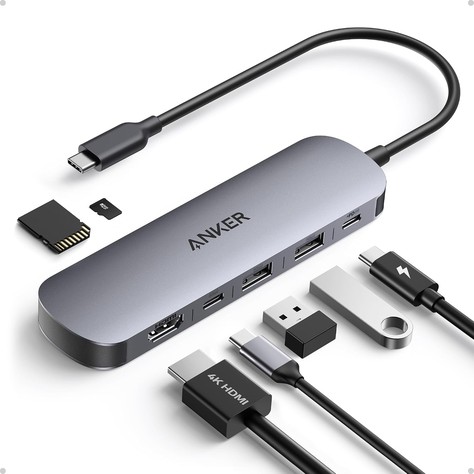
Who it’s for: MacBook Air travelers who mainly need 4K@60Hz HDMI, PD pass-through, USB-A/C data, and SD/TF card slots without paying for Ethernet.
Why it made the list: It’s the cheapest strong Mac-friendly pick here and still claims the Air essentials: 4K@60Hz HDMI, up to 85W PD pass-through (100W in minus hub draw), two 5Gbps USB-A ports, one 5Gbps USB-C data port, and dual SD/TF readers in a slim stick with a ~9.8-inch cable. Anker calls out USB-C with DP Alt Mode and Power Delivery, plus USB4 / Thunderbolt host ports — exactly what M-series Airs provide. It has 5,700+ ratings (~4.5★), an Amazon’s Choice badge, 10,000+ bought in a recent month, a #2 spot in USB Hubs, and an 18-month warranty, and it ships from Amazon / AnkerDirect. It was $19.99 at research time (list $25.99).
Watch-outs: No Ethernet — grab the UGREEN Ethernet picks or Anker 555 if hotel LAN matters. Data ports are 5Gbps, not 10Gbps. Pass-through still needs a capable PD wall charger (not included). Not Linux-compatible per the listing notes. Confirm the live price stays under $50.
3. UGREEN Revodok Pro 9-in-1 — Best with Ethernet
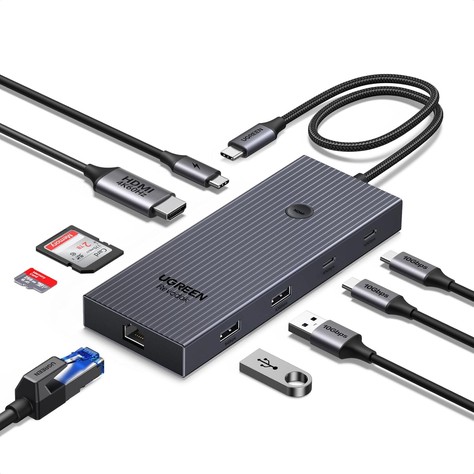
Who it’s for: MacBook Air WFH and hotel users who want Gigabit Ethernet plus 4K@60Hz HDMI, SD/TF, and 10Gbps data in one hub under $30.
Why it made the list: This Revodok Pro 9-in-1 packs 4K@60Hz HDMI, Gigabit RJ45, up to 85W PD pass-through, SD/TF readers, and USB-A/USB-C data ports rated up to 10Gbps, plus a physical HDMI on/off button that owners like for clamshell or second-screen control. UGREEN explicitly lists MacBook Air / Pro M1–M5 compatibility. MacBook Air M3 owners in reviews describe plug-and-play HDMI and Ethernet for dual-external setups within Apple’s display limits. It has 1,700+ ratings (~4.5★), an Amazon’s Choice badge, 1,000+ bought in a recent month, a #63 spot in USB Hubs, and a 24-month warranty note, and it ships from Amazon / UGREEN GROUP LIMITED. It was $29.99 at research time (list $42.94).
Watch-outs: Bulkier than the slim Anker 7-in-1 — better as a desk/travel pouch hub than a shirt-pocket stick. Mac users may need to add the USB LAN adapter under System Settings → Network on first plug. Some longevity complaints appear in reviews (HDMI or ports failing after months), so lean on Amazon’s return window and UGREEN’s warranty. Confirm the live price stays under $50.
4. UGREEN Revodok 7-in-1 (Ethernet) — Best Compact Multiport
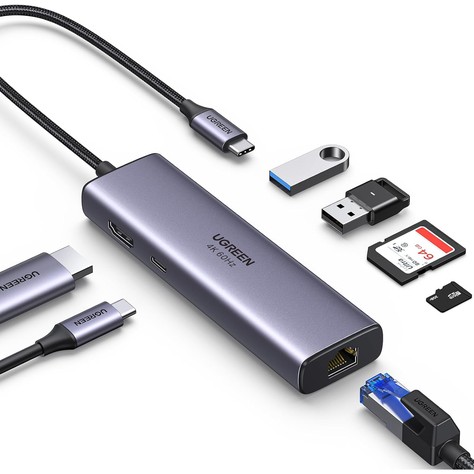
Who it’s for: Anyone who wants a proven compact Ethernet + SD + HDMI stick for MacBook Air without the Pro 9-in-1’s extra bulk or 10Gbps ports.
Why it made the list: The classic Revodok 7-in-1 still hits the Air checklist: 4K@60Hz HDMI, Gigabit Ethernet, up to 85W PD pass-through, SD/TF readers, and dual USB-A 3.0 (5Gbps) ports in a travel-friendly body with a huge review base. UGREEN lists MacBook Air M1–M5 compatibility and notes that 4K@60Hz needs a DP 1.4-capable host (M-series Airs qualify). It has 9,100+ ratings (~4.5★), 200+ bought in a recent month, a #208 spot in USB Hubs, and a 24-month warranty note, and it ships from Amazon / UGREEN GROUP LIMITED. It was $29.99 at research time (list $39.99).
Watch-outs: USB data is 5Gbps, not 10Gbps — fine for mice, keyboards, and everyday drives, slower for huge video dumps than the Pro 9-in-1 or Anker 555. Heat under load is a recurring review theme; leave airflow around the hub. Same Mac Network setup tip as other USB Ethernet adapters. Confirm the live price stays under $50.
5. Plugable USBC-9IN1E (9-in-1) — Best High PD
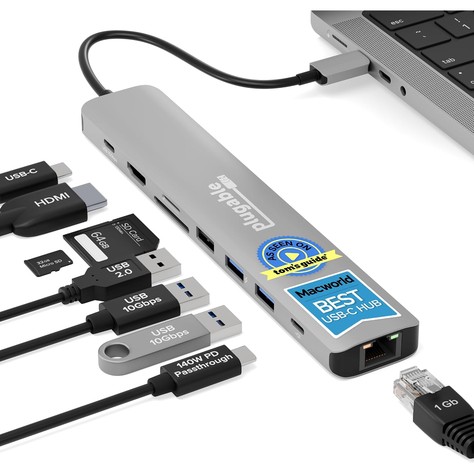
Who it’s for: MacBook Air (and future-proof laptop) buyers who want the highest PD headroom under $50, UHS-II card readers, Ethernet, and US-based Plugable support.
Why it made the list: Named Macworld’s Best Overall USB-C Hub 2026 in Plugable’s listing copy, this 9-in-1 adds 4K@60Hz HDMI, Gigabit Ethernet, 10Gbps USB-C and dual 10Gbps USB-A (plus USB 2.0 for keyboard/mouse), UHS-II SD/microSD up to 312Mbps, and PD 3.1 EPR input up to 140W (about 125W to host) — with typical PD 3.0 systems still seeing ~100W in / 85W to the laptop after hub draw. That’s more headroom than a stock 30–35W Air charger needs, and it leaves room if you also use a higher-watt GaN brick or a heavier USB-C Windows laptop. Plugable lists M-series MacBooks, plug-and-play on macOS, and lifetime North American support with a 2-year manufacturer warranty. It has 365 ratings (~4.4★), 500+ bought in a recent month, and a #99 spot in USB Hubs, and it ships from / is sold by Plugable Technologies. It was $49.95 at research time.
Watch-outs: Fewer reviews than the Anker and UGREEN volume leaders — lean on the return window if you’re risk-averse. Some owners report tight SD slots or warm operation under load. 140W peak needs a PD 3.1 EPR charger; with a normal 65–100W GaN brick you still get solid Air charging, not magic 125W. Confirm the live price stays at or under $50.
How to choose a USB-C hub for MacBook Air
Start with PD + HDMI. Every pick here claims pass-through charging and 4K@60Hz HDMI. Pair the hub with a 65W (or higher) USB-C GaN wall charger so the Air charges while HDMI and USB ports stay busy.
Add Ethernet only if you need it. Cafe Wi-Fi and Zoom days love Gigabit RJ45 (Anker 555, both UGREENs, Plugable). Skip it and save money with the Anker 7-in-1 if you live on Wi-Fi.
SD/TF matters for creators. Dumping camera cards at a hotel desk is why the Anker 7-in-1, Anker 555, UGREENs, and Plugable (UHS-II) earn a slot. A separate reader works too, but one less dongle is nicer in a backpack.
Respect Apple Silicon display limits. One native external display on base M1/M2/M3 Air. M3 can do two externals in clamshell in some setups — still not a reason to buy a dual-HDMI hub expecting three independent screens from a cheap USB-C stick.
Thunderbolt vs USB-C hub. Thunderbolt docks cost more and unlock higher bandwidth / more displays on Pro chips. For Air HDMI + charge + USB-A under $50, a quality USB-C hub is the right tool.
Heat and cables. Hubs warm up when PD and HDMI run together — that’s common. Use short, known-good HDMI and USB-C PD cables; flaky cables cause more “hub is broken” returns than bad hubs.
FAQ
Will a USB-C hub give my M1/M2/M3 MacBook Air two external monitors?
Not by itself. Base M1 and M2 Air support one native external display. M3 Air can support two externals in clamshell mode in Apple’s documented setups, but a standard USB-C/DP Alt Mode hub still follows what the chip allows — it does not add DisplayLink multi-monitor magic. For more than one external on base M1/M2, you need a DisplayLink dock and its drivers.
How much PD wattage does a MacBook Air need through a hub?
Apple ships many Airs with 30W or 35W chargers; higher wattage still works and can charge faster when the machine is under load. Hub listings that advertise 85W pass-through (from a 100W charger minus ~15W hub draw) are more than enough for Air. Use a 65W+ GaN brick on the hub’s PD port for comfortable all-day desk use.
Is 4K@30Hz good enough, or do I need 4K@60Hz?
4K@30Hz is usable for documents and static slides; 4K@60Hz feels smoother for video calls, scrolling, and motion. All five picks here claim 4K@60Hz on compatible hosts. If an older hub only offered 4K@30Hz, treat 60Hz as the upgrade worth paying a few dollars for.
Is a Thunderbolt dock better than these USB-C hubs for MacBook Air?
A Thunderbolt 3/4 dock can offer more bandwidth and, on higher MacBook Pro chips, more display flexibility — at a much higher price. For Air owners who need HDMI, charge, USB-A, and maybe Ethernet/SD under $50, a well-reviewed USB-C hub is the practical buy. Save Thunderbolt budget for Pro workflows.
Do I need drivers on macOS?
HDMI, USB data, SD, and PD are typically plug-and-play. USB Gigabit Ethernet adapters sometimes need you to enable the new interface under System Settings → Network (UGREEN’s FAQ mentions adding the AX88179 adapter). Keep macOS updated if a port misbehaves after sleep.
Quick takeaway
Pick the Anker 555 if you want the default Air desk hub with Ethernet and SD, the Anker 7-in-1 when you want 4K@60Hz + SD on a tight budget without Ethernet, the UGREEN Revodok Pro 9-in-1 for Gigabit LAN plus 10Gbps data and an HDMI off button, the UGREEN Revodok 7-in-1 for a compact Ethernet+SD stick with a huge review count, and the Plugable USBC-9IN1E when high PD headroom and UHS-II card readers matter most under $50. Feed any of these from a solid brick in our Best USB-C GaN Chargers Under $40 (2026), and raise the Air to eye level with a pick from our Best Laptop Stands Under $50 (2026) roundup. For a broader under-$40 hub shortlist (not Air-specific), see our Best USB-C Hubs Under $40 (2026) guide. Prices move often, so check the current Amazon listing before you order.


Leave a Reply